tibbr® is a communication and collaboration tool designed for the workplace, enabling users to collaborate by participating in communication threads about different subjects.
If you use tibbr® to collaborate with your colleagues, you may want to share your Spotfire analyses with them. Specifically, you can share pages, visualizations, and bookmarks.
To reach the Share to tibbr® dialog:
Right click on a page title, in a visualization, or on a bookmark and select Share > Page/Visualization/Bookmark to tibbr®.
Response: If this is the first time you share to
tibbr® during this Spotfire session,
you will be prompted to log into the tibbr®
server. See Details on
Log into tibbr.
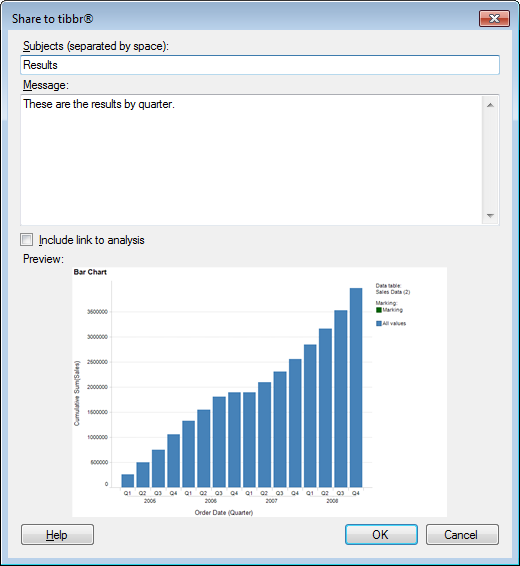
Otherwise, you will be directly presented with the dialog below:
Option |
Description |
Subjects |
Type the tibbr® subject to which to post here. If you start writing something you will be presented with a list of available subjects, starting with that letter, to choose from. Note: If you do not enter a subject, you will post to your own wall. |
Message |
Type a message to post to tibbr here. |
Include
link to analysis |
Select this option to include a link to the Web Player version of the analysis. Note: This option will only be available if the analysis is stored in the library and the Web Player is installed and configured. Otherwise, only the Preview image will be shown. |
Preview |
This is a preview of the image that will be posted to tibbr. |
See also: