Group-based and role-based synchronization
For Active Directory servers, Spotfire Server can synchronize groups. For the Directory Server product family, Spotfire Server can synchronize either groups or roles.
Here are examples of the default behavior of group-based and role-based group synchronization. The examples are based on the following figure:
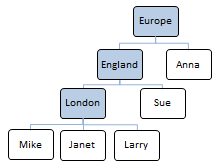
Group-based synchronization:
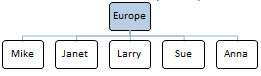
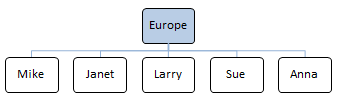
- If you only specify the group "Europe" to be synchronized in your LDAP configuration, the user directory synchronizes according to the figure below. The groups England and London will not be visible because they are automatically replaced with their members:
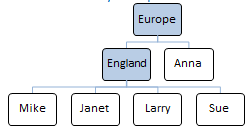
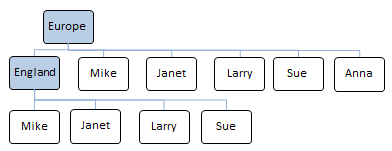
- If you specify the groups "Europe" and "England" to be synchronized in your LDAP configuration, the user directory will synchronize according to the figure below. The group London will not be visible, but will automatically be replaced with its members:
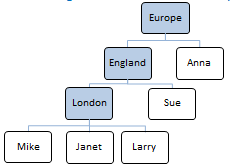
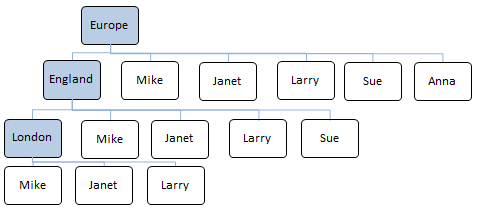
- If you specify the groups "Europe", "England", and "London" explicitly to be synchronized in your LDAP configuration, the user directory will synchronize according to the figure below:
Role-based synchronization:
- If you only specify the role "Europe" to be synchronized in your LDAP configuration, the user directory will synchronize according to the figure below. The roles England and London will not be visible, but will automatically be replaced with their members:
- If you specify the roles "Europe" and "England" to be synchronized in your LDAP configuration, the user directory will synchronize according to the figure below. The role London will not be visible. Due to the nature of roles in the Directory Server product family, every role will automatically include all direct members as well as all members of sub roles:
- If you specify the roles "Europe", "England" and "London" explicitly to be synchronized in your LDAP configuration, the user directory synchronizes according to the figure below. Due to the nature of roles in the Directory Server product family, every role automatically includes all direct members as well as all members of sub-roles:
There are two algorithms to choose from when configuring group synchronization: the
memberOf and the
member algorithms.
- The
memberOfalgorithm relies on a calculated attribute in the LDAP directory and may induce more load on the LDAP servers. Not all LDAP directories support thememberOfalgorithm. - The
memberalgorithm performs significantly more LDAP queries, but with much smaller result sets than thememberOfalgorithm. See the recommendations below for group synchronization on different LDAP servers.
Recommendations
For Microsoft Active Directory server:
- Configure group-based synchronization with the
memberOfalgorithm.
For Sun Java System Directory Server (version 6 and later), do one of the following:
- Configure group-based synchronization with the
memberOfalgorithm. - Configure role-based synchronization with the
memberOfalgorithm.
For Sun ONE Directory Server (version 5 and earlier), do one of the following:
- Configure role-based synchronization with the
memberOfalgorithm. - Configure group-based synchronization with the
memberalgorithm.
Note: The following combinations do
not work on Sun ONE Directory Servers:
- Configuring group-based synchronization with the
memberOfalgorithm. - Configuring role-based synchronization with the
memberalgorithm.