SQL Support for SAP BW
This section describes SQL support for SAP BW and its resource types—functions, tables, and ABAP queries.
Understanding SAP BW with TDV
TDV has made the interface between TDV and SAP BW as efficient and accurate as possible. However, due to some product limitations and proprietary interfaces, TDV and SAP BW results might differ, and performance issues might occur when accessing SAP BW data using TDV. The following sections provide additional information.
Differences in Queries and Results
Queries in SAP BW using BEx are created differently in TDV. In TDV, SQL queries generate MDX. The process is different in SAP BW using BEx. This disparity can cause differences in results. Workarounds are described in this section. See
Introspection Resources for information about how TDV interprets SAP BW resources in TDV.
Queries with Input Values
Queries can require input values. To handle queries with input values in TDV, set the values using a WHERE clause and provide values for columns that begin with an underscore (_). For an example, see
Variables.
Queries with Filters
BEx queries that contain filters might not return the same results in TDV as they do in BEx. To apply the filters in TDV, recreate them using a WHERE clause. This limitation is imposed by SAP BW; TDV does not have access to the filters.
Additional Columns in Query Results
BEx queries do not return the same columns in TDV as they do in BEx. For example, you might see 1,000 columns in TDV listing every property of every dimension in the query, even if you did not include those properties in BEx. This is because the SAP BW API does not give TDV access to all of the items selected for output in the query. TDV only gets a list of InfoObjects. From there, TDV expands each one to include all of its columns.
Performance Considerations
Performance of TDV’s SAP BW Adapter is slower and more resource-intensive on the SAP BW server than accessing SAP BW through native SAP tools, because SAP does not give TDV access to proprietary APIs.
When performance issues occur when using TDV with SAP BW, you can reproduce them outside of TDV by copying the MDX statements generated by TDV (by examining the TDV cs_server.log) and entering them into the MDX test environment (transaction MDXTEST in SAP GUI). This allows SAP BW administrators to optimize settings and improve performance of the MDX statements.
Introspection Resources
This section describes the details of introspecting SAP BW resources.
Resource Hierarchy in SAP BW
The organization of SAP BW resources in TDV mirrors SAP BW as much as possible. InfoAreas in SAP BW become folders and subfolders in TDV. Supported InfoObjects are organized into subfolders.
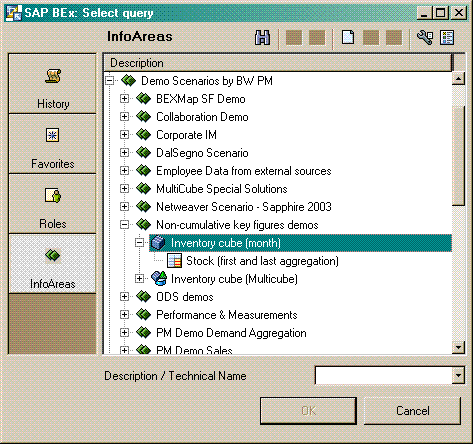
In the following screenshot of BeX Analyzer, nodes have been expanded in InfoAreas to reveal the InfoProvider Inventory cube (month) which contains the Query Stock (first and last aggregation).
The next section shows how the equivalent resources look in TDV.
Resource Hierarchy in TDV
As with BEx Analyzer, TDV displays only the objects that the user is authorized to see.
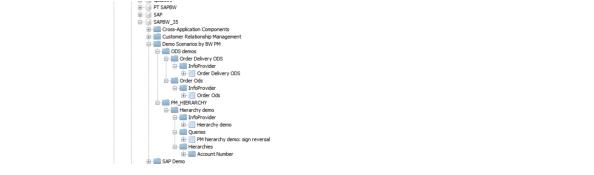
InfoAreas in BeX Analyzer are displayed as folders in Studio, and these folders are named after the InfoArea’s technical name or description. Moving the mouse over an item reveals a tool-tip with its technical name and type.
InfoProviders contain up to three subfolders to group resources by type, as described below.
• InfoProvider: This folder contains a single resource, the InfoProvider itself. This resource provides direct access to the InfoProvider without requiring construction of a Query.
• Queries: This folder contains all of the Query objects built from the InfoProvider. Query objects, also known as Query Cubes, are views into an InfoProvider created in BeX Analyzer.
• Hierarchies: This folder contains subfolders for each Basic Characteristic referenced within the InfoProvider. Each Characteristic contains at least one Hierarchy resource. ODS Objects do not contain the Hierarchies folder.
Metadata Mapping, Multi-Dimensional
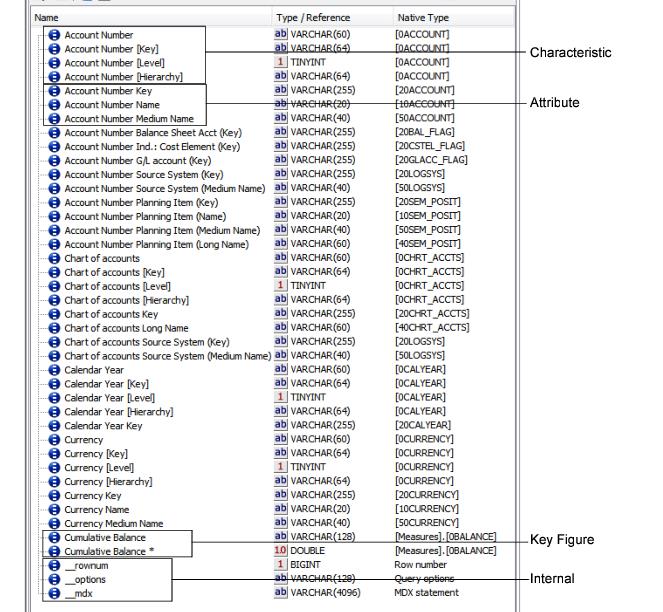
The data structures present in multi-dimensional InfoProvider, Query, or Hierarchy objects are transformed into a flat namespace of columns in TDV. InfoProviders and Queries contain three types of data relevant to TDV: Characteristics, Attributes, and Key Figures. Queries may contain Variables as well. Hierarchies contain only Characteristics and Attributes. The next screen shot illustrates the column types in a typical Query.
Characteristics
Each Characteristic is represented by four columns containing Characteristic metadata, differentiated by naming conventions:
• Characteristic—This column’s name is just the Characteristic’s short description. It contains the member caption. The native type is the technical name of the Characteristic.
• Characteristic [Key]—The key column contains the member name, without square brackets. The native type is the technical name of the Characteristic.
• Characteristic [Level]—The level column contains the level of the current member, where zero is the root of the hierarchy. The native type is the technical name of the Characteristic.
• Characteristic [Hierarchy]—The hierarchy column contains the hierarchy in which the current member belongs (64 character VARCHAR). The native type is the technical name of the Characteristic.
Attributes
Following the Characteristic columns are Characteristic Attributes. Each Attribute is named using the Characteristic short description, a space, and the Attribute description. Its native type is the technical name of the Attribute. Its data type is VARCHAR, with the length determined by SAP BW metadata, defaulting to 255 characters if metadata is not available.
Key Figures
Each Key Figure is represented as two columns. One column contains the formatted value; the other contains the unformatted, numeric value. Both columns are named using the Key Figure name, but the numeric value field has an asterisk (*) suffix to differentiate it. The native type is the technical name of the Key Figure. The data type of the formatted Key Figure is a 128 character VARCHAR. The data type of the unformatted value is DOUBLE.
Variables
Variables only appear in Query objects. They can be identified by the single underscore before their names. The data type is VARCHAR of length determined by SAP BW metadata. The native type is the technical name of the variable.
Internal Columns
Internal columns are created for use within TDV SQL and do not correspond to objects in SAP BW. Their names are prefaced with two underscores, and they appear at the end of the list of columns. Each Internal column has a unique function, as discussed in
Query Mapping.
Metadata Mapping, ODS
The InfoObjects in an ODS InfoProvider are transformed into a set of columns in TDV.
Each InfoObject becomes a column, named using the InfoObject’s short text. The native type is a concatenation of the InfoObject type and its SAP data type, for example “CHA C” is a Characteristic with SAP data type C. InfoObject types are listed below:
CHA—Characteristic
DPA—Data packet characteristic
KYF—Key figure
TIM—Time characteristic
UNI—Unit of measurement
The data type of the column is determined by its SAP data type. The supported SAP data types and their corresponding TDV data types are:
C—VARCHAR
D—DATE
F—DOUBLE
g—VARCHAR
I—BIGINT
N—VARCHAR
P—DECIMAL, NUMERIC
T—TIME
X—VARCHAR
Capabilities
Capabilities characterize the features and limitations of data sources. For example, an Oracle data source can execute subqueries, while SAP BW cannot. Capabilities are consulted when a query is processed so that data sources receive only the query processing work they support; otherwise, TDV performs the work itself.
This section includes the following topics:
MDX Capabilities
The following table lists commonly used capabilities and whether they are supported in queries against SAP BW. Pushed indicates whether query processing can be passed to SAP BW. For efficient queries, minimize use of non-push capabilities.
Capability | Supported | Pushed | Notes |
Filter | Yes, with special usage | Yes | Filters are mapped to MDX as specified in Query Mapping. |
Filter–IN | Yes, with special behavior | Yes | |
Functions–CAST | Yes | Yes | |
ORDER BY | Yes | Yes | Filters are mapped to MDX as specified in Query Mapping. |
CASE | Yes | No | |
DISTINCT | Yes | No | |
Filter–BETWEEN | Yes, with special usage. | No | Filters are mapped to MDX as specified in Query Mapping |
Functions–aggregate | Yes | No | |
Functions–others | Yes | No | |
GROUP BY | Yes | No | |
Join | Yes | No | |
Subquery | Yes | No | |
UNION | Yes | No | |
DELETE | No | No | |
Filter-LIKE | No | No | |
INSERT | No | No | |
Transactions | No | No | |
UPDATE | No | No | |
ODS Capabilities
The following table lists capabilities that apply to ODS Objects, whether they are supported against ODS Objects, and whether query processing can be pushed to SAP BW. For efficient queries, minimize use of non-push capabilities. Capabilities for ODS objects are:
Capability | Supported | Pushed | Notes |
CASE | Yes | No | |
DELETE | No | No | |
DISTINCT | Yes | No | |
Filter | Yes | Yes | All conditional operators are supported. The keywords OR, AND, and grouping of terms with parentheses have no impact on the query other than to indicate the list of filters. Filters containing NULL literals are ignored. |
Filter—BETWEEN | Yes | Yes | |
Filter—IN | Yes | Yes | See notes on “Filter—BETWEEN” above. |
Filter—LIKE | Yes | No | |
Functions—aggregate | Yes | No | |
Functions—CAST | Yes | Yes | |
Functions—others | Yes | No | |
GROUP BY | Yes | No | |
INSERT | No | No | |
Join | Yes | No | |
ORDER BY | Yes | Yes | Order is always ascending due to limitations of the SAP BAPI. ASC and DESC keywords are ignored. |
Subquery | Yes | No | |
Transactions | No | No | |
UNION | Yes | No | |
UPDATE | No | No | |
Query Mapping
This section describes how queries are mapped from SQL to MDX. This mapping is critical to content and performance.
Characteristics
Characteristics selected in SQL are projected onto the Query Axis ROWS (Axis 1). Multiple Characteristics are cross-joined, resulting in a Cartesian product of all selected Characteristics. This creates a rows-and-columns data set for TDV. Selecting many Characteristics could result in long-running queries and huge result sets.
A Characteristic projected without a filter adds its MEMBERS set to the cross-join. If the active Hierarchy contains more than two levels, the MDX DRILLDOWNLEVEL function is applied to produce a set containing all nodes of the Hierarchy. Additionally, the MDX HIERARCHIZE function is applied to order the members in their hierarchical order.
To restrict the Characteristic to specific members, apply a filter (WHERE clause) to the Characteristic or the Characteristic [Key] column. For example, the following query produces a cross-join of Company code, Division, and Sales organization, and restricts Sales organization to the one with key 2200:
SELECT
"Company code", "Division", "Sales organization", "Costs in Document currency (SAP Demo)", "Billed Quantity (SAP Demo)"
FROM
"SAP DemoCube"
WHERE
"Sales organization [Key]" = '2200'
If a member key cannot be found in the Hierarchy, a warning is logged but the query continues. The log is in the file cs_server.log, located in the subdirectory logs of <TDV_install_dir>.
If you do not know the member key, you can use the member text, also known as the “caption,” but note that member texts may not be unique. To avoid ambiguous queries, it is best to filter on member keys.
The following query accomplishes the same effect as the query above, but refers to Sales organization 2200 by its text designation (Paris):
SELECT
"Company code", "Division", "Sales organization", "Costs in Document currency (SAP Demo)", "Billed Quantity (SAP Demo)"
FROM
"SAP DemoCube"
WHERE
"Sales organization" = 'Paris'
Characteristics have the following functionality:
• All conditional operators and the BETWEEN keyword are supported. Operators other than equals (=) and not equals (<>) have special meaning for ranges, discussed next.
• To create a range from the natural order of the hierarchy, use the greater than (>) or less than (<) symbol.
• Ranges can be specified only on the Characteristic [Key] column.
• The keywords OR, AND, IN, and grouping of terms with parentheses have no impact on the query other than to indicate the list of members.
• Members can be excluded by using the not equals (<>) operator or the NOT keyword. These map to the EXCEPT set expression.
• If no members can be found for a member text, an exception is thrown.
• Filters are not allowed on the column Characteristic [Level] and cause an exception.
• ies are supported. To specify a non-default Hierarchy, filter on the Characteristic [Hierarchy] column. All operators are treated as equals (=). The filter value is a Hierarchy key (enclosed in square brackets) or name. Values that cannot be resolved to a Hierarchy, and multiple Hierarchy filters on the same Characteristic, cause an exception.
Attributes
Attributes, also known as Dimension Properties, typically contain data related to the Characteristic. For example, the Characteristic “Company Code” contains an attribute named “Country (Name).”
Filter behavior for Attributes is similar to that of ordinary SQL queries:
• All conditional operators are supported, plus the BETWEEN keyword.
• The keywords OR, AND, and NOT, and grouping of terms using parentheses, are supported.
• The IN keyword is supported.
• IS NULL is mapped to test for empty strings.
Unlike in MDX, Attributes can be selected without their parent Characteristic. TDV selects the parent Characteristic automatically. This adds a Characteristic to the cross-join, which increases the load on SAP BW, the network, and TDV.
Key Figures
Key Figures, also known as Measures, contain numeric data that is aggregated based on the sets present in the query. They are projected on the Query Axis COLUMNS (Axis 0).
Both the formatted and unformatted (numeric) values are available as columns and behave identically in queries,.
Filter behavior for Key Figures is similar to that of ordinary SQL queries. The following filters are supported:
• NULL is treated as empty string. IS NULL is mapped to test for empty string.
• All conditional operators are supported, as well as the BETWEEN keyword.
• The keywords OR, AND, and NOT are supported. Grouping of terms with parentheses is also supported.
• The IN keyword is supported.
Ordering
Ordering of data is accomplished with the ORDER BY clause, adapted to work with SAP BW in the following ways:
• Ordering on Characteristic, Attribute, and Key Figure is supported.
• Ordering by more than one column is not allowed and causes an exception.
• The sort keywords ASC and DESC are supported, within the hierarchy. To sort regardless of hierarchy, specify the orderBreaksHierarchy query option. For more information, see the section
Query Options.
• Ordering on Internal, Characteristic [Level] or Characteristic [Hierarchy] columns cannot be pushed to SAP BW. To order on these columns, create a Parameterized Query and a View that selects from it.
Slicers
When a filter is placed on a column that is not projected, TDV treats the filter as a Slicer, placing it on the Slicer Axis. A Slicer qualifies tuples for each cell of the query, but does not affect the Query Axis. For example:
SELECT
Company Code, Division, Sales
FROM
DemoCube
WHERE
Calendar Month/Year = 'JAN 2001'
The above query returns the Sales Key Figure for the cross-join of Company Code and Division Characteristics, with cells restricted to tuples including the January 2001 member of the Calendar Month/Year Characteristic. This may result in many empty rows where Company Code/Division contains no Sales data, but these are removed by default. (To display empty rows, specify the query option includeEmptyRows. For more information, see the
Query Options.)
Slicers have the following behavior:
• The only column types permitted as Slicers are Characteristic and Characteristic [Key]. Others are ignored.
• All conditional operators except not equals (<>) are treated as equals (=).
• Multiple members are combined into a set. The keywords OR and AND are treated identically as means of delineating members belonging to the set.
• Members can be excluded by using the not equals (<>) operator or the NOT keyword. These map to the EXCEPT set expression.
• To specify a range from the natural order of the hierarchy, use greater than (>) or less than (<).
• Ranges without an upper and lower bound cause an exception.
• Only the Characteristic [Key] column type can be used to specify ranges. Ranges on other columns cause an exception.
• If the Slicer Axis consists of more than one member, it may be necessary to specify the order of members in the MDX. This is not possible from SQL, as the TDV query engine does not preserve the order of terms in a WHERE clause. To control the query to this extent, use custom MDX. See
Custom MDX for further information.
Note: In BeX Query Designer, Slicers are called Filters.
Variables
Variables are features of SAP BW Queries. To provide a Variable value, add a filter to the SQL statement. Depending on the variable type, the value can be a member key (enclosed in square brackets), member text, or literal.
In the following example, the Variable Sales organization is assigned to members whose text matches the values USA Philadelphia or USA Denver.
SELECT
"Business Partner", "Calendar Year/Month",
"Returns Quantity", "Returns Value"
FROM
"Returns per Business Partner"
WHERE
"_Sales organization" IN ('USA Philadelphia', 'USA Denver')
The annotation of a Variable column includes guidance for how to use it within a query.
Rules for using Variables in queries are as follows:
• Variables with selection type Complex are allowed to contain multiple values.
• Variables with selection type Value are only allowed to contain a single value.
• All conditional operators and the BETWEEN keyword are supported.
• The keywords OR, AND, IN, and grouping of terms with parentheses ,are supported, but have no impact on the query other than to indicate the list of variable assignments.
• Multiple values for the same variable are mapped to INCLUDING or, with the keyword NOT, EXCLUDING.
• NULL is treated as empty string. IS NULL is mapped to test for empty string.
Custom MDX
The Internal column “__mdx” in InfoProvider and Query resources allows custom MDX to be sent directly to SAP BW, bypassing SQL-to-MDX query mapping in TDV. This helps when you need to access features of MDX without using SQL; but then MDX queries cannot be used with other queries. TDV has no visibility to tune them.
The following is an example of using custom MDX in a query. The MDX function TOPCOUNT is used to provide ranking and ordering which cannot be accomplished in SQL:
SELECT
"Sales Personnel", "Calendar Year/Month",
"Net value of the invoice item in the docCurrency (SAP Demo)"
FROM
"SAP DemoCube"
WHERE
"__mdx" =
'SELECT NON EMPTY { [Measures].[0D_NETVLINV] } ON AXIS(0),
NON EMPTY {TOPCOUNT({[0D_SALE_EMP].[LEVEL01].MEMBERS *
[0CALMONTH].[LEVEL01].MEMBERS }, 3,
[Measures].[0D_NETVLINV])} ON AXIS(1)
FROM [$0D_DECU]
WHERE [0CALYEAR].[1998]'
Developing MDX can be challenging. It is best to work within a specialized OLAP tool to develop the initial query, test it, and then paste it into Studio.
Additionally, a number of rules must be followed for the MDX to execute properly within TDV:
• Axis 0 must contain Key Figures only.
• Axis 1 must contain Characteristics only.
• No other axes are permitted.
• The SELECT clause in TDV must contain corresponding columns for the Key Figures, Characteristics, and Attributes projected in the MDX statement. If any columns are missing or if any extraneous columns are introduced, the query fails, returns no data, or returns incomplete data.
Query Options
An internal column named “__options” (two underscores) is provided for every InfoProvider and Query resource. This column accepts a comma-delimited list of query options, which can modify the behavior of the SAP BW query in ways that cannot be expressed in SQL.
Valid options are the following:
• leafNodes: This option overrides the selection of the Data Source advanced property named Show leaf nodes only for the duration of the query. With this option, only members of dimensions that do not contain children are returned.
• allNodes: This option overrides the selection of the advanced property named Show leaf nodes only for the duration of the query. All nodes are returned exactly as received from SAP BW, regardless of their position in the hierarchy.
• orderBreaksHierarchy: When ordering rows with ORDER BY, the default behavior is to order members first by their position in the hierarchy, and then by the Characteristic, Attribute, or Key Figure specified in the ORDER BY clause. This option indicates that the hierarchy should be broken when ordering data.
• includeEmptyRows: This option specifies that the NON EMPTY clause is to be omitted from the ROWS axis for this query. Depending on the SAP BW data and query, this may result in empty values in Characteristic or Attribute columns. By default, empty rows are removed. Here is an example of the includeEmptyRows option:
SELECT
"Company code",
"Division",
"Sales organization",
"Costs in Document currency (SAP Demo)",
"Billed Quantity (SAP Demo)",
"__rownum"
FROM
/shared/QA_SAPBW/Sources/SAPBW_35/"SAP Demo"/"SAP Demo Sales and Distribution"/"SAP DemoCube"/InfoProvider/"SAP DemoCube"
WHERE "Sales organization" = 'Paris'
AND "__options" = 'includeEmptyRows'
• includeEmptyColumns: Specifies that the NON EMPTY clause is omitted from the COLUMNS axis for this query. This may result in empty values in Key Figure columns. By default, empty columns are removed.
Row Number
The natural order of data from SAP BW may be important to preserve. Without an explicit ORDER BY clause, results from SAP BW are ordered hierarchically. Once the data is reordered due to a join or other SQL operation, it cannot be restored through ORDER BY or any other operator in TDV because it relies on the hierarchical order available only to SAP BW.
For this reason, an Internal column named “__rownum” (two underscores) exists for every SAP BW resource in TDV. Values in this column range from 0 to n, indicating the natural order of data as returned from SAP BW. This makes it possible to preserve the natural order of the data. This column can be selected, but not in a filter expression.
Time-Dependent Queries
Hierarchy nodes and other data in SAP BW can change. By default, queries run using the current date. To set a different date, create a filter on the “__options” Internal column, using the keyDate option and a date in YYYY-MM-DD format.
In the following example, the query is executed with a key date of January 1, 2006:
SELECT
"Sold-to party", "Net value of the invoice item in the docCurrency (SAP Demo)"
FROM
SAP_DemoCube
WHERE
"__options" = 'keyDate 2006-01-01'
Enabling Tracing
Tracing logs every interaction with SAP BW to files so that data values can be examined and validated against output in TDV. Combined with the debug output in cs_server.log, this can be helpful for troubleshooting queries.
To enable tracing
1. Edit this properties file:
<TDV install directory>\apps\dlm\app_ds_sapbw\conf\product.properties
2. Change the property sapbw.trace to true.
3. Restart the TDV Server.
4. Check the trace files that are stored in the following directory:
<TDV_install_dir>\apps\dlm\app_ds_sapbw
Note: Tracing affects performance and creates large files on disk, so be sure to change the sapbw.trace property to false and restart TDV Server when tracing is no longer needed.
Working with Large Batch Sizes
If your developers work with queries that return large amounts of data, or depend on the amount of available memory, you might be able to improve performance by adjusting the batch size.
Typically, the batch size should not be changed. If the setting is too high, the server requires too much memory to process the results from SAP BW and can crash. If the setting is too low, query performance can suffer because the server might unnecessarily split up single queries into multiple queries. However, depending on other factors such a network latency and bandwidth, it is possible that increasing the batch size could result in improved performance on queries that return amounts of data larger than the batch size.
• If the TDV server has a large amount of memory available to the JVM, the batch size might be increased.
• If the TDV server has a shortage of memory, the batch size might be decreased.
To enable working with large files
1. Open this properties file using your favorite text editor:
<TDV_install_dir>\apps\dlm\app_ds_sapbw\conf\product.properties
2. Change the property sapbw.batchSize setting.
By default, sapbw.batchSize is set to 25000 cells (TDV requests 25000 cells for each call to SAP BW). If there are more cells in the response, TDV makes more requests for 25000 cells until all of the data is transferred from SAP BW to TDV. The minimum setting for sapbw.batchSize is 1; the maximum is 999999.
3. Restart TDV Server.
Multidimensional Queries
Queries against SAP BW are multidimensional, which introduces a new behavior to TDV that may be unexpected to users accustomed to querying relational databases.
The Show Contents Feature
The feature Show Contents available in Studio is not recommended on any SAP BW resource. Show Contents performs a SELECT * query, which results in a cross-join of every possible Characteristic in the SAP BW resource.
Create OLAP Views Using SAP BW Data Sources
When creating a new view that uses an SAP BW data source in combination with other data sources, or when using multiple data sources of any type, use the New OLAP View command in Studio to create a new view.
If you are creating a view that calls only one SAP BW data source, you can create a New OLAP View in Studio. For more information about OLAP Views, see the TDV User Guide.
Work with Views
TDV Server makes a number of assumptions when optimizing queries, which can cause confusion. This is especially true when building Views that call other Views, or when using Views from outside of TDV using JDBC or ODBC. Because a cross-join is used to query SAP BW, when a Characteristic column is removed from a query due to optimization, the meaning of the underlying MDX query changes dramatically.
For example, if a View includes the Characteristics “Company Code” and “Division” and “Key Figure Sales,” an ODBC query selecting only “Division” and “Sales” produces a different data set than a query selecting all columns. To ensure the same base data are returned regardless of the query, wrap any Views using SAP BW in a Parameterized Query, and expose the Parameterized Query to query users. This prevents TDV from applying relational optimization rules to the multi-dimensional query.
Filter on Levels
You can filter on level columns (Dimension [Level]). For example, you can add a WHERE clause to the SQL statement that filters the [Level] field:
SELECT Dimension1, Dimension2, Measure
FROM Cube
WHERE "Dimension1 [Level]" = 2
This would return Measure for the cross product of Dimension1 (members beginning from level 2 and below) and Dimension2 (all members).
Clearing the SAP BW Metadata Cache
TDV caches SAP BW metadata to improve query performance. These caches are automatically cleared after every TDV restart, but you might want to do this at other times.
For example, your SAP BW data source might become out of sync with the SAP BW database, even after re-introspecting the data. If the metadata is still out of sync after re-introspection, you can restart the TDV instance, or you can clear the metadata cache as described in this section.
To clear the metadata cache
1. Open the SAP BW data source.
2. Select the Re-Introspection tab.
3. Click Clear Metadata Cache.
Joins and Query Performance
Joins cannot be pushed to SAP BW. Executing joins in TDV can degrade performance, because a table scan would be required, and it would fetch every row of the joined tables. The technology that TDV uses to connect with SAP BW is not optimized for large data sets, so table scans should be avoided.
A semijoin is the best way to reduce the number of SAP BW rows retrieved and processed. To force a semijoin to occur in a query, add the option immediately before the table to be joined. Example:
SELECT *
FROM X INNER {OPTION SEMIJOIN} JOIN Y ON X.Key = Y.Key
Values of X.Key are collected and passed in a query to Y as the filter:
SELECT * FROM X
SELECT * FROM Y WHERE Key IN ({values_of_X.Key_from_previous_query})
If X has many rows, queries against Y can be lengthy. If the queries against Y become too large, TDV automatically partitions them and reassembles the results into a unified set.
Put the table that returns the larger number of rows on the right side of the join whenever possible. When running a new query for the first time, activate the Execution Plan tab in the Studio and click Execute and Show Statistics. Examine each node’s row count and query after processing has begun to make sure that filters are pushed down to SAP BW. This is a good way to see the mechanics of a semijoin in action. If the interaction between TDV Server and SAP BW is still unclear and performance is poor, enable debug logging for the adapter as described in the TDV Installation and Upgrade Guide.