TDV SQL Support for Salesforce.com
Salesforce.com exposes functionality through a set of SOAP RPC services operating on a namespace of data objects called SObjects. Leveraging these services and a query language called SOQL (Sforce Object Query Language), the Salesforce.com Adapter provides SQL access to Salesforce.com as a relational data source.
The following sections describe how Salesforce.com resources operate within TDV. This topic describes how TDV interprets and supports Salesforce.com SQL statements and objects.
Introspection
Resource Hierarchy
The Salesforce.com Adapter provides Salesforce.com SObjects as resources within TDV. SObjects are introspected by selecting them by name from a flat name space. If you're not sure which SObject contains the data you need, examine the tabs on the Salesforce.com Web site or consult its documentation.
Metadata Mapping
Each field of the Salesforce.com SObject becomes a column in TDV with the same name. Each data type in Salesforce.com is mapped to a TDV SQL-based type. The following table lists the Salesforce.com data types, whether they are supported in TDV, and their corresponding TDV types.
Salesforce.com Type Name | Supported? | TDV Data Type |
STRING, TEXTAREA, PHONE, URL, EMAIL, COMBOBOX, PICKLIST, MULTIPICKLIST | Yes | VARCHAR |
BOOLEAN | Yes | BIT |
INT | Yes | BIGINT |
DOUBLE, CURRENCY, PERCENT | Yes | DECIMAL, NUMERIC |
DATE | Yes | DATE |
DATETIME | Yes | TIMESTAMP |
BASE64 | Yes | VARCHAR |
ID, REFERENCE | Yes | VARCHAR(18) |
Capabilities
Capabilities are a system of classifying the unique features and limitations of data sources. For example, an Oracle data source can execute subqueries, but Salesforce.com cannot. Capabilities are consulted when a query is processed so that data sources receive only the query processing work they support. Where a capability is lacking in a data source but required to run a query, TDV performs the work itself.
The following table lists commonly used capabilities and how they apply to Salesforce.com. The Supported column indicates whether or not the SQL capability is supported in queries against Salesforce.com. The Pushed column indicates whether the capability is supported directly on Salesforce.com, allowing the query processing work to be off-loaded to it. For efficient queries, minimize use of non-pushed capabilities.
Capability | Supported? | Pushed? | Notes |
CASE | Yes | No | |
DELETE | Yes | Yes | |
DISTINCT | No | No | |
Filter | Yes | Yes | Filters comparing two columns of the same SObject are not allowed by Salesforce.com. If a filter is applied to a column that has the “filterable” attribute set to false, the query is executed in TDV instead of being pushed to the Salesforce data source. |
Filter – BETWEEN | Yes | Yes | |
Filter – IN | Yes | Yes | |
Filter – LIKE | Yes | Yes | |
Functions – Aggregate | Yes | No | |
Functions – CAST | Yes | Yes | |
Function – ConvertCurrency | Yes | Yes | Salesforce.com-specific function. Currency management must be enabled in Salesforce.com for this to function properly. Salesforce.com constraints on the use of ConvertCurrency apply. See Salesforce.com documentation for more information. |
Functions – Others | Yes | No | |
Function – ToLabel | Yes | Yes | Salesforce.com-specific function. |
GROUP BY | Yes | No | |
INSERT | Yes | Yes | |
JOIN | Yes | Yes | See Joins for details about join types that are pushed. |
ORDER BY | Yes | No | |
Subquery | Yes | No | |
Transactions | No | No | |
UNION | Yes | No | |
UPDATE | Yes | Yes | |
Joins
When it is possible to optimize the performance of queries with joins, TDV uses any join information it finds to convert standard SQL to SOQL and pushes this to the source Salesforce.com database at run time (that is, when data is actually retrieved). Specifically, queries with inner and outer joins that have parent-to-child or child-to-parent relationships are pushed to Salesforce.com at run time. If these relationships do not exist, the joins are processed in TDV at run time.
Note: You can disable pushing joins to Salesforce.com. See
Disabling Pushing Join Execution. If you import a CAR file with Salesforce.com resources from a TDV release prior to 6.2 SP2, you must reintrospect the resources to take advantage of the join pushing capabilities.
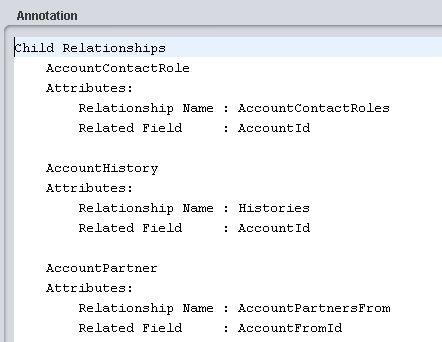
Join relationships are evaluated when a Salesforce.com data source is created and introspected. If any parent-to-child or child-to-parent relationships are discovered in any tables during introspection, the child relationships are collected for each table and inserted in the Annotation field :
This information is for user information only and cannot be edited. If the Annotation field is empty, no child relationships exist for this table.
Parent relationships are displayed as foreign key relationships in TDV in the table’s Foreign Keys tab. The foreign and primary key relationships are used at run time.
Joins Pushed to Salesforce.com
TDV can push right outer joins, left outer joins, and inner joins to Salesforce.com. Examples of how TDV translates these joins from SQL into SOQL are provided below.
Right Outer Join
Find all opportunity records and their related accounts.
SQL:
SELECT
o.Id, o.Name,
A.Id, A.Name
FROM /shared/QA_SForce/Sources/SForce/Account a right outer join
/shared/QA_SForce/Sources/SForce/Opportunity o
on a.id = o.AccountId
SOQL:
Select Id, Name, Account.Id, Account.Name
From Opportunity
Left Outer Join
Find all the accounts and their related opportunity records.
SQL:
SELECT
A.Id, A.Name,
o.AccountId, o.Name
FROM /shared/QA_SForce/Sources/SForce/Account a left outer join
/shared/QA_SForce/Sources/SForce/Opportunity o
on a.id = o.AccountId
SOQL:
Select Id, Name, (Select AccountId, Name From Opportunities)
From Account
Inner Join
Find all accounts where there exists an opportunity record.
SQL:
SELECT
A.Id, A.Name
FROM /shared/QA_SForce/Sources/SForce/Account a inner join
/shared/QA_SForce/Sources/SForce/Opportunity o
on a.id = o.AccountId
SOQL:
Select Id, Name
From Account
Where Id In
(Select AccountId from Opportunity)
Disabling Pushing Join Execution
TDV is configured to automatically push any joins it can to Salesforce.com. You can disable pushing join execution to Salesforce.com this way:
• Use the DISABLE_PUSH option in your query, as in this example:
SELECT {option DISABLE_PUSH}
o.Id, o.Name,
A.Id, A.Name
FROM /shared/QA_SForce/Sources/SForce/Account a right outer join
/shared/QA_SForce/Sources/SForce/Opportunity o
on a.id = o.AccountId
Semijoins
A semijoin is the best way to reduce the number of Salesforce.com rows retrieved and processed by TDV, thus improving query performance. To force a semijoin to occur in a query, add it immediately before the table to be joined. For example:
SELECT * FROM A INNER JOIN { option semijoin } B ON A.K = B.K
Values of A.K are collected and passed in a query to B as the filter.
SELECT * FROM A
SELECT * FROM B WHERE K IN ({values of A.K from previous query})
If there are many rows in A, this can result in lengthy queries against B. TDV automatically partitions the queries against B if they become too large. Partitioning means the query is broken up into smaller queries that are executed separately and reassembled to produce a unified result set.
Put the larger table on the right side of the join whenever possible. When running a new query for the first time, display the Execution Plan in Studio (click Show Execution Plan in the resource editor) and then click Execute and Show Statistics. Examine each node's row count and query after processing has begun to make sure filters are pushed down to Salesforce.com. This is a good way to see the mechanics of a semijoin in action. If the interaction between TDV and Salesforce.com is still unclear and performance is poor, enable debug logging as described in the TDV Installation and Upgrade Guide. This can help illustrate how a SQL statement on TDV becomes a series of requests to Salesforce.com.
Multipicklists with SQL
Multipicklists are a data type within Salesforce.com which allow the user to select multiple values from a list of valid values. When selected in SQL queries within TDV, Multipicklists are displayed as a series of values delimited by semicolons. For example, if the user has selected Bob and Mary from a Multipicklist, the value visible to TDV is Bob;Mary.
To treat the selected values as separate for the purposes of filtering, Salesforce.com provides special operators to their query language. This section describes how to structure your SQL query in TDV to leverage these operators.
Equal
When the Multipicklist field uses the equality operator, it is converted to the includes operator when issued to Salesforce.com. For example, the following SQL statement returns rows where the field Multipicklist__c includes Value1 in its selection:
SELECT * FROM TestObject1__c
WHERE MultiPickList__c = ‘Value1’
This query results in the following filter on the query issued to Salesforce.com:
WHERE MultiPickList__c includes (‘Value1’)
Not Equal
When the Multipicklist field uses the inequality operator, it is converted to the NOT and includes operators when issued to Salesforce.com. For example, the following SQL statement returns rows where the field Multipicklist__c includes Value1 in its selection:
SELECT * FROM TestObject1__c
WHERE MultiPickList__c != ‘Value1’
This query results in the following filter on the query issued to Salesforce.com:
WHERE NOT (MultiPickList__c includes (‘Value1’))"
Includes
A Multipicklist field includes a value if the field’s selection includes the value among its selected values. The IN keyword is used to instruct TDV that the INCLUDES syntax should be pushed to Salesforce.com. For example, the following SQL statement returns rows where the field Multipicklist__c includes Value1 and Value2 in its selection:
SELECT * FROM TestObject1__c
WHERE MultiPickList__c IN ('Value1', 'Value2')
This query results in the following filter on the query issued to Salesforce.com:
WHERE MultiPickList__c includes ('Value1','Value2')
Excludes
A Multipicklist field excludes a value if the field’s selection does not include the value among its selected values. The NOT IN keyword is used to instruct TDV that the EXCLUDES syntax should be pushed to Salesforce.com. For example, the following SQL statement returns rows where the field Multipicklist__c does not include Value1 and Value2 in its selection:
SELECT {OPTION DISABLE_PUSH}
*
FROM TestObject1__c
WHERE MultiPickList__c NOT IN ('Value1', 'Value2')
Note: The DISABLE_PUSH option is required to ensure that Salesforce.com does not return NULLs.
This query results in the following filter on the query issued to Salesforce.com:
WHERE MultiPickList__c excludes ('Value1','Value2')
Lead Conversion
Salesforce.com provides a ConvertLead API call which converts a Lead into an Account, Contact, or Opportunity. The stored procedure named convertLead within the Salesforce.com Data Source can be leveraged to access this functionality.
To convert a Lead, the Salesforce.com data source must be logged into Salesforce.com with Convert Leads permission and Edit permission on Leads, as well as sufficient permissions to create or update, as applicable, any associated Account, Contact, and Opportunity.
The details involved in converting a lead are outside the scope of this document. For more information, see the Salesforce API documentation in the Developer section of the Salesforce.com Web site.
Updated and Deleted Objects
Salesforce.com provides stored procedures named GetUpdated and GetDeleted, which are API calls that return IDs of specified objects updated or deleted between dates in a specified range.
To be accessed through GetUpdated and GetUpdated, an object must be configured so that it can be replicated. Results are returned for no more than 30 days previous to the day the call is executed. They need to return the IDs of Contacts that have been updated or deleted on the current date.
Upsert
The Upsert API call creates new records and updates existing records. Use Upsert instead of Create to avoid creating unwanted duplicate records.
Upsert uses a custom field to determine the presence of existing records. All records must be of the same object type. Maximum array size is 200.
Inputs
externalIdFieldName: Determines whether it should create a new record or update an existing one.
objectType: The record type.
dataSql: SQL Used to generate the new records. Each row in the resulting result set corresponds to a record in SalesForce. The dataCursor input can be used instead.
dataCursor: Input cursor used to generate the new records. Each row in the resulting result set corresponds to a record in SalesForce. The dataSql input can be used instead.
fields: Comma-separated list of fields in the record. If this is NULL, fields are extracted from the dataSql or dataCursor if possible. Otherwise, an error occur.
Outputs
Upsert outputs a cursor containing the Upsert results:
id: Salesforce ID of the record.
isCreated: Boolean indicating if the record was newly created or not.
Merge
Merge merges records of the same object type into one of the records, deletes the others, and adjusts the parenting of related records.
Inputs
objectType: The master record type. The only supported types are Lead, Contact, and Account.
masterRecordId: The ID of the master record that others are merged into.
recordToMergeIds: Comma-separated list of the records to merge into the master record.
Outputs
A cursor containing the merge results.
Packaged Query
TDV supports packaged queries against Salesforce.com using SOQL.
This support allows for the building of views on top of the packaged queries to flatten the nested results. If relevant metadata is available, it is pushed down using joins.
Data Modification in Salesforce.com
INSERT, UPDATE, and DELETE operations can be performed directly against any Salesforce.com data source. In TDV, this is done through a SQL Script. For details on SQL scripts, see the TDV Reference Manual.
Data modification in Salesforce.com is governed by a set of business rules often defined on a per SObject basis, which are beyond the scope of this document to address in depth. This section contains a summary of some rules, paraphrased from the Salesforce.com API documentation.
If a data modification request to Salesforce.com is not processed as expected, it may be due to a business rule on the Salesforce.com server. For more information about the specifics of updating Salesforce.com SObjects, consult the Salesforce API documentation, available in the Developer section of the Salesforce.com Web site.
INSERT INTO
The INSERT INTO statement creates a new SObject instance of a particular type. The type is determined by the resource provided as the table to the command. Following the resource name, a list of field names and values provide the data to initialize the new object.
For example:
INSERT INTO /shared/DataServicesForSalesforce.com/Sources/Salesforce.com/Contact
(FirstName, LastName, MailingStreet, MailingCity, MailingState, MailingPostalCode,
MailingCountry, Phone)
VALUES ('Marc', 'Benioff',
'1 Market St Suite 300', 'San Francisco', 'CA', '94105', 'US',
'415-555-1212');
Below are a few of the areas to consider while developing an INSERT INTO statement:
• Account security. The Salesforce.com account used by TDV must have sufficient access rights to create objects of the specified type.
• Object and field security. Some objects and certain fields within those objects require special handling or permissions. For example, you might also need permissions to access this object’s parent object. Some objects cannot be created through the API.
• Generated fields. Salesforce.com generates unique values for some fields automatically. You cannot explicitly specify an ID, CreatedDate, CreatedById, LastModifiedDate, LastModifiedById, and SystemModstamp.
• Required fields. For required fields that do not have a preconfigured default value, you must supply a value.
• Default values. For some objects, some fields have a default value. If you do not specify a value for such fields, Salesforce.com populates these fields with the default value.
• Referential integrity. If you are creating an object that is the child of a parent object, you must supply the foreign key information that links the child to the parent.
• Number of records inserted at a time. When doing an insert into Salesforce.com, TDV always uses batch inserts of no more than 200 records at a time.
UPDATE
The UPDATE statement changes one or more SObject instances, based on a filter and list of fields and values. The SObject type is determined by the resource provided as the table to the command. Following the resource name, a list of field-value pairs detail the changes to be performed on the selected objects. Finally a filter specifies the conditions to be satisfied for an update to take place on a given row.
For example:
UPDATE /shared/DataServicesForSalesforce.com/Sources/Salesforce.com/Contact
SET "Phone" = '415-555-9999'
WHERE "FirstName" = 'Marc' AND "LastName" = 'Benioff';
Below are a few of the areas to consider while developing an UPDATE statement:
• Account security. The Salesforce.com account used by TDV must have sufficient access rights to update objects of the specified type.
• Object and field security. Some objects and certain fields within those objects require special handling or permissions. For example, you might also need permissions to access this object’s parent object. Some objects cannot be updated through the API.
• Generated fields. Salesforce.com generates unique values for some fields automatically. You cannot explicitly update an ID, CreatedDate, CreatedById, LastModifiedDate, LastModifiedById, and SystemModstamp.
• Required fields. When updating required fields, you must supply a value—you cannot set the value to null.
• Referential integrity. Fields whose names contain “Id” are either that object’s primary key or a foreign key. Salesforce.com does not allow the update of primary keys, but foreign keys can be updated.
• Object change limit. Salesforce.com allows up to 200 objects to be changed in a single request. If an update request exceeds 200 objects, the entire operation fails (unless the Advanced data source property Batch Updates is enabled).
DELETE
The DELETE statement removes one or more SObject instances based on a filter. The SObject type is determined by the resource provided as the table to the command. Following the resource name, a filter specifies the conditions to be satisfied for a delete to take place on a given row. For example:
DELETE FROM /shared/DataServicesForSalesforce.com/Sources/Salesforce.com/Contact
WHERE "FirstName" = 'John' AND "LastName" = 'Doe';
These are a few of the areas to consider while developing a DELETE statement:
Area | Consideration |
Account security. | The Salesforce.com account used by TDV must have sufficient access rights to delete objects of the specified type. |
Object and field security. | You may need permissions to access this object’s parent object. Some objects cannot be deleted through the API. |
Referential integrity. | To ensure referential integrity, the DELETE call supports cascading deletes; that is, if you delete a parent object, you delete its children automatically, as long as each child object can be deleted. If the advanced data source property Batch Deletes is enabled, requests exceeding 200 objects can be handled. |