Linking With Conditions
You can create conditions when linking to a report, URL, or JavaScript function from a report or graph. For example, you may only be interested in displaying current salaries for a particular department. You can accomplish this by creating a WHEN condition.
For complete details on WHEN, see Controlling Report Formatting.
Link With Conditions
To specify a conditional link to a report use:
TYPE=type, [subtype], FOCEXEC=fex[(parameters...)],
   WHEN=expression,[TARGET=frame,] $
To specify a conditional link to a URL use:
TYPE=type, [subtype], URL=url[(parameters...)],
   WHEN=expression,[TARGET=frame,] $
To specify a conditional link to a JavaScript function use:
TYPE=type, [subtype], JAVASCRIPT=function[(parameters...)],
   WHEN=expression,[TARGET=frame,] $
Linking With Conditions
In this example, we only want to link the MIS value of the DEPARTMENT field to REPORT3. To do this we include the phrase WHEN=DEPARTMENT EQ 'MIS' in the StyleSheet declaration. The relevant declarations are highlighted in the requests.
Main report:
TABLE FILE EMPLOYEE
SUM CURR_SAL AS 'Total,Current,Salaries'
BY DEPARTMENT AS 'Department'
ON TABLE SET PAGE-NUM OFF
ON TABLE SET STYLE *
TYPE=REPORT, GRID=OFF, $
TYPE=DATA, COLUMN=N1, FOCEXEC=REPORT3(DEPARTMENT=N1),
     WHEN=DEPARTMENT EQ 'MIS', $
ENDSTYLE
END
Drill-down report (REPORT3):
TABLE FILE EMPLOYEE
PRINT SALARY
BY DEPARTMENT
BY LAST_NAME
WHERE DEPARTMENT EQ '&DEPARTMENT'
ON TABLE SET PAGE-NUM OFF
ON TABLE SET STYLE *
TYPE=REPORT, GRID=OFF, $
ENDSTYLE
END
In the following output, note that only the MIS department is linked:
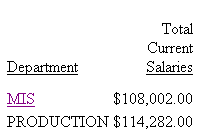
When you click MIS, the following output displays:
DEPARTMENT |
LAST NAME |
SALARY |
MIS |
BLACKWOOD |
$21,780.00 |
CROSS |
$27,062.00 |
|
$25,755.00 |
||
GREENSPAN |
$9,000.00 |
|
$8,650.00 |
||
JONES |
$18,480.00 |
|
$17,750.00 |
||
MCCOY |
$18,480.00 |
|
SMITH |
$13,200.00 |