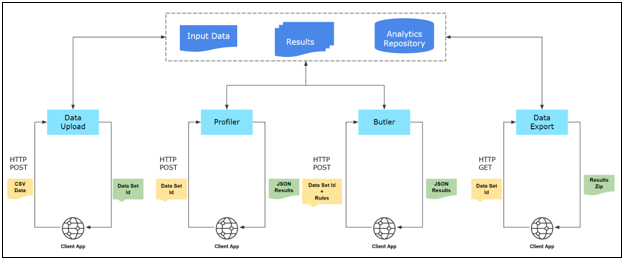
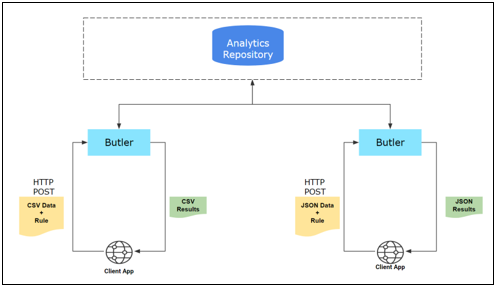
There are two ways of running Data Quality (DQ) analysis via the REST API services:
This is the recommended method for processing data in batch mode.
This is the recommended method for streaming data.
|
Batch Mode |
Transaction Mode |
|---|---|
|
Upload and analyze the entire data set. |
Send one or more transaction records in a request. |
|
Profile data. |
Profile analysis is not applicable for individual records. |
|
Apply multiple rules to different attributes of a data set. |
Execute one rule per request. |
|
Calculate Profile and DQ Scores. |
Scoring is not applicable for individual transactions. |
|
Save and retrieve input data, detailed results, and summarized reports. |
Input requests and responses are not stored in the file system. Summarized results are stored in the transaction details table in the database. |
Analyze an entire data set
Analyze one or more records one Rule at a time
Description
Use this endpoint to send a request with the user account credentials and receive a response with an access token.
Endpoint
https://{{host}}:9803/api/v1/authHTTP Method
POST
Request
|
username |
Name of the user account. |
|
password |
Password of the user account. |
Response
|
access_token |
Access tokens are used in token-based authentication to allow an application to access an API. The application receives an access token after a user successfully authenticates and authorizes access, then passes the access token as a credential when it calls the target API. |
|
refresh_token |
Typically, a user needs a new access token after the previous access token granted to them expires. A Refresh Token is a credential artifact that OAuth can use to get a new access token without user interaction. This allows the Authorization Server to shorten the access token lifetime for security purposes without involving the user when the access token expires. |
|
scope |
Default: openid The application uses OIDC to verify the user's identity |
|
id_token |
ID tokens are used in token-based authentication to cache user profile information and provide it to a client application, thereby providing better performance and experience. |
|
token_type |
Default: Bearer A bearer token means that the bearer can access authorized resources without further identification. |
|
expires_in |
Default: 3600 seconds |
Description
Use this endpoint to upload an input data set.
Endpoint
https://{{host}}:9803/api/v1/valet/uploadHTTP Method
POST
Authorization
|
Bearer Token |
The access_token received in the authorization response. |
Parameters
|
dataset |
Name of the input data set. |
|
charset |
Character encoding. Supported values are: UTF-8, UTF-16, or ISO-8859-1 |
|
hasHeader |
Flag to indicate if the input data set has a header column. Supported values are: true or false |
|
delimiter |
Field delimiter. Supported values are:
|
|
quoteCharacter |
Enclosing character if text within a field also includes the delimiter character. Supported values are:
|
|
sourceType |
Indicate whether the data source is considered internal or external to the organization. Supported values are: Internal or External |
|
sourceName |
Name of the data source. |
|
appName |
Name of the application that generated the data. |
|
industry |
Select an industry represented by the data. Supported values are: NAICS industry descriptions (see NAICS Industry Classification below) |
|
entity |
Name of the business entity the data represents (e.g., customer, partner, supplier, office). |
|
pct |
For large data sets, it is recommended to upload data in smaller chunks. Use this parameter to indicate the percentage of data loaded into TIBCO DQ. For example, if there are 10 chunks and you are uploading the second chunk, then set this value to 20. |
|
lastChunk |
Use this value to indicate the final chunk of the data. Set this value to false if the request body is not the last chunk of the data set. Set this value to true if the request body is the last chunk of the data set. Supported values are: false or true |
NAICS Industry Classification
|
Agriculture, Forestry, Fishing and Hunting |
|
Mining, Quarrying, and Oil and Gas Extraction |
|
Utilities |
|
Construction |
|
Manufacturing |
|
Wholesale Trade |
|
Retail Trade |
|
Transportation and Warehousing |
|
Information |
|
Finance and Insurance |
|
Real Estate and Rental and Leasing |
|
Professional, Scientific, and Technical Services |
|
Management of Companies and Enterprises |
|
Administrative and Support and Waste Management and Remediation Services |
|
Educational Services |
|
Health Care and Social Assistance |
|
Arts, Entertainment, and Recreation |
|
Accommodation and Food Services |
|
Other Services (except Public Administration) |
|
Public Administration |
Request Body
|
Rows of input data with columns separated by a delimiter. |
Response
|
status |
CREATED when the data set is uploaded successfully (or OK when the request is not the last chunk). |
|
code |
201 when the data set is uploaded successfully (or 200 when the request is not the last chunk). |
|
message |
The ID of the data set to be used in subsequent requests. |
|
developerMessage |
UPLOAD_COMPLETE (or UPLOAD_STARTED when the request is not the last chunk). |
|
responsetype |
NA |
|
response |
NA |
|
exception |
NA |
Description
Use this endpoint to request a data profile analysis on a previously uploaded data set.
Endpoint
https://{{host}}:9803/api/v1/{{dataset-id}}/profileWithOptionsHTTP Method
POST
Authorization
|
Bearer Token |
The access_token received in the authorization response. |
Parameters
|
dataset-id (path) |
A unique identifier for the data set, this ID should have the same value as the message value received in the response JSON in the Upload Data Set step. |
Request Body
For each column that should be included in the data profile analysis:
|
id |
Name of the column |
|
businessImpact |
A number that represents HIGH, MEDIUM, or LOW. Default values are: HIGH: 10, MEDIUM: 5, LOW: 1 Check with your administrator to find the values setup for your implementation. |
|
allowNulls |
Indicate whether you expect Null values in this column. Supported values are: true (nulls are expected) or false (nulls are not expected) |
|
shouldBeUnique |
Indicate whether you expect column values to be unique. Supported values are: true (values should be unique) or false (values can be non-unique) |
Example:
[
{
"id": "first_name",
"businessImpact": 10,
"allowNull": false,
"shouldBeUnique": true
},
{
"id": "last_name",
"businessImpact": 10,
"allowNull": false,
"shouldBeUnique": true
},
]Response
|
status |
OK when the data is profiled successfully. |
|
code |
200 when the data is profiled successfully. |
|
message |
This value is the same as the unique identifier for the data set, message value received in the response JSON should match the ID of the data set sent in the request parameter. |
|
developerMessage |
NA |
|
responsetype |
com.tibco.tdq.common.model.profile.Profile |
|
response |
The output data profile in JSON format. For more information, see Profiling Results JSON Schema. |
|
exception |
NA |
Description
Use this endpoint to deduplicate rows on a previously uploaded data set.
Endpoint
https://{{host}}:9803/api/v1/{{dataset-id}}/deduplicateHTTP Method
POST
Authorization
|
Bearer Token |
The access_token received in the authorization response. |
Parameters
|
dataset-id (path) |
A unique identifier for the data set, this ID should have the same value as the message value received in the response JSON in the Upload Data Set step. |
Request Body
NA
Response
|
status |
OK when data deduplication is successful. |
|
code |
200 when data deduplication is successful. |
|
message |
This value is the same as the unique identifier for the data set, message value received in the response JSON should match the ID of the data set sent in the request parameter. |
|
developerMessage |
NA |
|
responsetype |
com.tibco.tdq.common.model.profile.Deduplicate |
|
response |
|
|
exception |
NA |
Description
Use this endpoint to run numeric analysis on columns that have numeric data.
Endpoint
https://{{host}}:9803/api/v1/{{dataset-id}}/profile/numericsHTTP Method
POST
Authorization
|
Bearer Token |
The access_token received in the authorization response. |
Parameters
|
dataset-id (path) |
A unique identifier for the data set, this ID should have the same value as the message value received in the response JSON in the Upload Data Set step. |
Request Body
An array of strings with column names enclosed in double-quotes. For example:
[
"age",
"billed",
"paid"
]Response
|
status |
OK when the numeric data is profiled successfully. |
|
code |
200 when the numeric data is profiled successfully. |
|
message |
This value is the same as the unique identifier for the data set, message value received in the response JSON should match the ID of the data set sent in the request parameter. |
|
developerMessage |
NA |
|
responsetype |
com.tibco.tdq.common.model.profile.Deduplicate |
|
response |
The new data profile in JSON format. For more information, see Profiling Results JSON Schema. |
|
exception |
NA |
Description
Use this endpoint to run correlation analysis on columns that have numeric, date, or categorical data.
Endpoint
https://{{host}}:9803/api/v1/{{dataset-id}}/correlationsHTTP Method
POST
Authorization
|
Bearer Token |
The access_token received in the authorization response. |
Parameters
|
dataset-id (path) |
A unique identifier for the data set, this ID should have the same value as the message value received in the response JSON in the Upload Data Set step. |
|
count |
Specify the number of rows for correlation analysis. Note: Max number of observations that can be uploaded for correlations is 500,000. Adjust the number of data attributes and the row count to reduce the total number of observations if it exceeds the max limit. |
|
correlation |
Specify the correlation method. You can specify more than one method by adding multiple correlation parameters (up to 3 max). Supported values are: kendall, pearson, spearman |
Request Body
An array of strings with column names enclosed in double-quotes. For example:
[
"age",
"spending_score",
"billed"
]Response
|
status |
OK when the correlation analysis is successful. |
|
code |
200 when the correlation analysis is successful. |
|
message |
This value is the same as the unique identifier for the data set, message value received in the response JSON should match the ID of the data set sent in the request parameter. |
|
developerMessage |
NA |
|
responsetype |
NA |
|
response (An array of response values in JSON format - one for each correlation method you chose.) |
|
|
exception |
NA |
Description
Use this endpoint to run K-Means clustering analysis on a pair of columns.
Endpoint
https://{{host}}:9803/api/v1/{{dataset-id}}/clustering/kmeansHTTP Method
POST
Authorization
|
Bearer Token |
The access_token received in the authorization response. |
Parameters
|
dataset-id (path) |
A unique identifier for the data set, this ID should have the same value as the message value received in the response JSON in the Upload Data Set step. |
|
clusters |
Specify the number of clusters you expect in the data set (default is set to 3, min allowed is 1, and max allowed is 25). |
|
count |
Specify the number of rows for clustering analysis (max allowed is 4000). |
|
sampling |
Specify the sampling order (Top or Bottom). If your data set has more than 4000 rows, then this order determines the top or bottom 4000 rows sampled for analysis. Supported values are: head or tail |
Request Body
An array of two column names enclosed in double-quotes, the first column represents x-axis and the second column represents y-axis.
[
"age",
"spending_score"
]Response
|
status |
OK when K-Means clustering analysis is successful. |
|
code |
200 when K-Means clustering analysis is successful. |
|
message |
This value is the same as the unique identifier for the data set, message value received in the response JSON should match the ID of the data set sent in the request parameter. |
|
developerMessage |
NA |
|
responsetype |
NA |
|
response (Response values in JSON format.) |
|
|
exception |
NA |
Description
Use this endpoint to download the profile for a previously analyzed data set.
Endpoint
https://{{host}}:9803/api/v1/valet/{{dataset-id}}/profile/export/HTTP Method
GET
Authorization
|
Bearer Token |
The access_token received in the authorization response. |
Parameters
|
dataset-id (path) |
A unique identifier for the data set, this ID should have the same value as the message value received in the response JSON in the Upload Data Set step. |
Request Body
NA
Response
The requested data set profile in JSON format. For more information, see Profiling Results JSON Schema.
Description
Use this endpoint to download correlation results for a previously analyzed data set.
Endpoint
https://{{host}}:9803/api/v1/{{dataset-id}}/{{artifact-correlations}}/exportHTTP Method
GET
Authorization
|
Bearer Token |
The access_token received in the authorization response. |
Parameters
|
dataset-id (path) |
A unique identifier for the data set, this ID should have the same value as the message value received in the response JSON in the Upload Data Set step. |
|
artifact-correlations |
Supported values are: correlations |
Request Body
NA
Response
|
response (An array of response values in JSON format, one for each correlation method you chose. For more information, see Correlation Analysis Results JSON Schema.) |
|
Description
Use this endpoint to download K-Means clustering analysis results for a previously analyzed data set.
Endpoint
https://{{host}}:9803/api/v1/{{dataset-id}}/{{artifact-kmeans}}/exportHTTP Method
GET
Authorization
|
Bearer Token |
The access_token received in the authorization response. |
Parameters
|
dataset-id (path) |
A unique identifier for the data set, this ID should have the same value as the message value received in the response JSON in the Upload Data Set step. |
|
artifact-kmeans (path) |
Supported values are: kmeans |
Request Body
NA
Response
|
response (Response values in JSON format. For more information, see K-Means Cluster Analysis Results JSON Schema.) |
|
Description
Use this endpoint to download a list of Rules available in that instance of TIBCO DQ.
Endpoint
https://{{host}}:9803/api/v1/rulesHTTP Method
GET
Authorization
|
Bearer Token |
The access_token received in the authorization response. |
Parameters
|
status |
Supported values are: ACTIVE or INACTIVE |
Request Body
NA
Response
|
status |
OK when retrieving the list of rules is successful. |
|
code |
200 when retrieving the list of rules is successful. |
|
message |
NA |
|
developerMessage |
NA |
|
responsetype |
com.tibco.tdq.common.model.rules.Rule |
|
response (An array of values in JSON format, one per rule.) |
Refer to the Rule JSON schema. |
|
exception |
NA |
Description
Use this endpoint to find Rules that match the input data attributes in a previously generated data profile.
Endpoint
https://{{host}}:9803/api/v1/{{dataset-id}}/profilematch/allHTTP Method
GET
Authorization
|
Bearer Token |
The access_token received in the authorization response. |
Parameters
|
dataset-id (path) |
A unique identifier for the data set, this ID should have the same value as the message value received in the response JSON in the Upload Data Set step. |
Request Body
NA
Response
|
status |
OK when retrieving the list of matching rules is successful. |
|
code |
200 when retrieving the list of matching rules is successful. |
|
message |
This value is the same as the unique identifier for the data set, message value received in the response JSON should match the id of the data set sent in the request parameter. |
|
developerMessage |
NA |
|
responsetype |
java.util.LinkedHashMap$LinkedValues |
|
response (An array of values in JSON format, one per input data attribute in the data set.) |
|
|
exception |
NA |
Description
Use this endpoint to submit a request with Rules to run a Data Quality (DQ) analysis against a previously uploaded data set.
Endpoint
https://{{host}}:9803/api/v1/{{dataset-id}}/butlerHTTP Method
POST
Authorization
|
Bearer Token |
The access_token received in the authorization response. |
Parameters
|
dataset-id (path) |
A unique identifier for the data set, this ID should have the same value as the message value received in the response JSON in the Upload Data Set step. |
Request Body
For each Rule that should be executed in the data quality analysis:
|
ruleName |
Name of the Rule. |
|
groupName |
This is only applicable to Rules that require multiple input values. Specify a unique name for a group of data attributes that are mapped to Rule inputs (see the example below). |
|
inputMap |
Specify input data attributes that map with the Rule inputs. |
|
ruleId |
Unique identifier for the Rule. |
Example:
{"matches" : [ {
"ruleName" : "compare_pair_int_values_eq",
"groupName" : "bill_vs_paid",
"inputMap" : {
"in_value_a" : "billed",
"in_value_b" : "paid"
},
"ruleId" : "compare_pair_int_values_eq"
}, {
"ruleName" : "compare_pair_int_values_eq",
"groupName" : "bill_vs_quote",
"inputMap" : {
"in_value_a" : "billed",
"in_value_b" : "quote"
},
"ruleId" : "compare_pair_int_values_eq"
}, {
"ruleName" : "cleanse_usa_phone",
"inputMap" : {
"in_phone" : "phone1"
},
"ruleId" : "cleanse_usa_phone"
}, {
"ruleName" : "cleanse_email",
"inputMap" : {
"in_email" : "email"
},
"ruleId" : "cleanse_email"
} ]}
Response
|
status |
OK when Rules execution is successful. |
|
code |
200 when Rules execution is successful. |
|
message |
This value is a unique identifier for the Analyze job that was executed. Users can submit multiple combinations of Rules for a given data set, each job will be associated with its unique Analyze Job ID. |
|
developerMessage |
This value is the same as the unique identifier for the data set, message value received in the response JSON should match the ID of the data set sent in the request parameter. |
|
responsetype |
com.tibco.tdq.common.model.butler.CleansingResults |
|
response |
For more information, see DQ Analysis Summary Results JSON Schema. |
|
exception |
NA |
Description
Use this endpoint to download analysis results for a data set.
Endpoint
https://{{host}}:9803/api/v1/valet/analyze/{{analysis-id}}/exportHTTP Method
GET
Authorization
|
Bearer Token |
The access_token received in the authorization response. |
Parameters
|
analysis-id (path) |
This is the unique identifier for the previous analysis job. This ID should have the same value as the message value received in the response JSON from the DQ Analysis With Rulesstep. |
Request Body
NA
Response
A .zip file that contains the following folders:
For more information, see Viewing Results.
Description
Use this endpoint to download analysis results for a data set.
Endpoint
https://{{host}}:9803/api/v1/valet/analyze/{{analysis-id}}/summary/exportHTTP Method
GET
Authorization
|
Bearer Token |
The access_token received in the authorization response. |
Parameters
|
analysis-id (path) |
This is the unique identifier for the previous analysis job. This ID should have the same value as the message value received in the response JSON from the DQ Analysis With Rulesstep. |
Request Body
NA
Response
The requested data quality analysis results in JSON format. For more information, see DQ Analysis Summary Results JSON Schema.
Description
Use this endpoint to delete the results of a previous DQ analysis job.
Endpoint
https://{{host}}:9803/api/v1/valet/analyze/{{analysis-id}}HTTP Method
DELETE
Authorization
|
Bearer Token |
The access_token received in the authorization response. |
Parameters
|
analysis-id (path) |
This is the unique identifier for the previous analysis job. This ID should have the same value as the message value received in the response JSON from the DQ Analysis With Rulesstep. |
Request Body
NA
Response
|
status |
OK when deletion is successful. |
|
code |
200 when deletion is successful. |
|
message |
NA |
|
developerMessage |
NA |
|
responsetype |
java.lang.Boolean |
|
response |
"true" when deletion is successful. |
|
exception |
NA |
Description
Use this endpoint to delete a previously uploaded data set along with all the analysis results.
Endpoint
https://{{host}}:9803/api/v1/valet/{{dataset-id}}HTTP Method
DELETE
Authorization
|
Bearer Token |
The access_token received in the authorization response. |
Parameters
|
dataset-id (path) |
A unique identifier for the data set, this ID should have the same value as the message value received in the response JSON in the Upload Data Set step. |
Request Body
NA
Response
|
status |
OK when deletion is successful. |
|
code |
200 when deletion is successful. |
|
message |
NA |
|
developerMessage |
NA |
|
responsetype |
java.lang.Boolean |
|
response |
"true" when deletion is successful. |
|
exception |
NA |
Description
Use this endpoint to submit CSV or JSON data in the request body and run an analysis with a single Rule, without uploading an entire data set. Results from these transactional requests are not scored. Results are summarized and stored in the watchdog_dqstats_trans_dtl view.
Endpoint
https://{{host}}:9803/api/v1/cleanseRecordsHTTP Method
POST
Authorization
|
Bearer Token |
The access_token received in the authorization response. |
Parameters
|
ruleId |
Unique identifier for the rule that you want to execute. |
Request Body
Response
|
status |
OK when execution is successful. |
|
code |
200 when execution is successful. |
|
message |
NA |
|
developerMessage |
NA |
|
responsetype |
java.lang.String |
|
response |
|
|
exception |
NA |