Concepts

In this section:

This section describes TIBCO DQ key concepts, facilities, and terminology you should familiarize yourself with prior to using the product.

Data Class

In TIBCO DQ, a Data Class represents a real-world entity.

Example: SSN, Credit Card, Email

Data classes are associated with a Sensitive Data flag to identify data classes that represent data objects containing confidential information.

The TIBCO DQ Profiler uses metadata classification algorithms to classify data attributes and associate them with known Data Classes. The TIBCO DQ Knowledge Hub provides the definitions for all the Data Classes that can be recognized by the Profiler. Users can review a list of Data Classes from the Data Class tab on the user interface. Users can also add new or custom Data Classes using the Data Class Editor.

For more information, see Managing Data Classes.

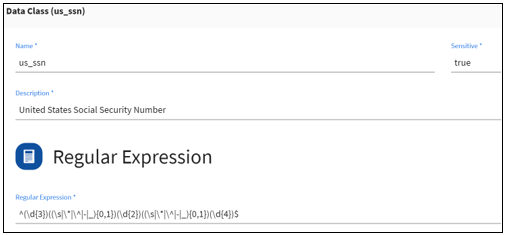
A sample definition for the built-in Data Class called us_ssn is shown below.
Rule

In this section:

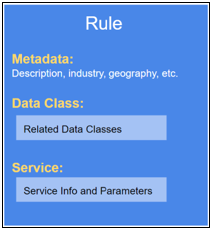
In TIBCO DQ, a Rule represents an implementation of a Service that can validate, cleanse, and/or enrich a class of data.

Example: cleanse_ssn, cleanse_payment_card, cleanse_email

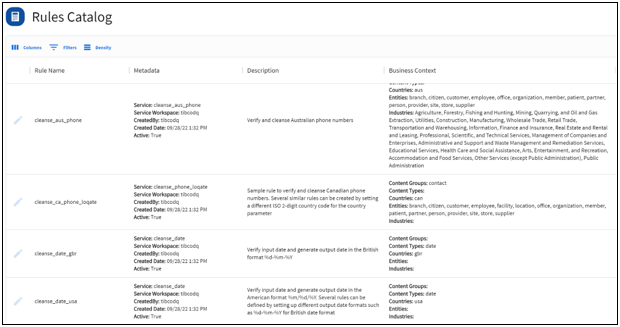
TIBCO DQ delivers a set of sample Rules for known Data Classes. Users can author new Rules using the Rules Editor. For more information, see Managing Rules.

Rules Catalog

Users can search the Rules Catalog and find Rules to associate with different data attributes. Rules are configured with Rule metadata that provides users additional context to find the most appropriate Rules for their data. Rule metadata generally includes Description, Data Classes, Industries, Geographies, Entities, etc.

Authoring

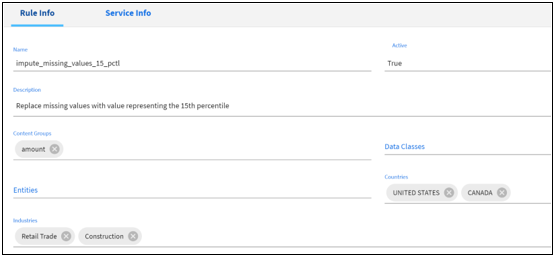
Users can define and add new rules using the Rules Editor.

Rules are generally associated with metadata to provide the context in which it should be executed. Rules are created and managed in the Rules Editor where the author specifies the rule metadata, selects a Service and configures the Service parameters. Multiple Rules can be created using a single Service.

For more information, see Managing Rules.

Service

In this section:

In TIBCO DQ, a Service represents a workflow that contains the logic to cleanse, validate, and enrich input data.

For more information, see Managing Services.

Authoring

Developers can author a data quality workflow in any language or tool and deploy it as a RESTful Service. Services have to comply with TIBCO DQ’s service requirements. For more information, see Service Requirements.

Customers can also opt to purchase a license for TIBCO Omni-Gen Data Quality Server (DQS) to build DQ plans and deploy them into the DQS container. For more information, see Authoring Services Using TIBCO Omni-Gen Data Quality Server.

Registration

Developers can test and register new Services using the Register Services API. For more information, see Service Registration.

Execution

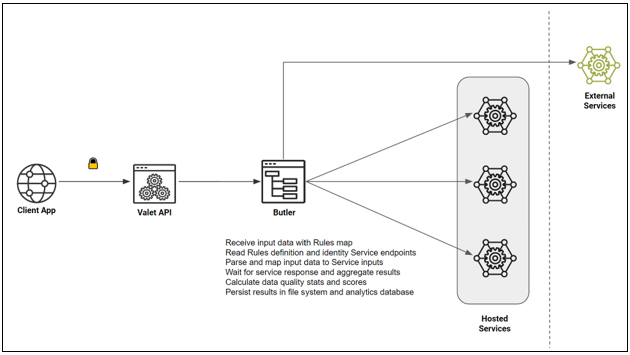
In TIBCO DQ, client applications can execute a DQ Service request via Rules. Clients cannot send direct requests to Service endpoints.

Note: In order to execute a DQ Service, you must create a Rule that references the Service.

When a client application submits a request to execute a set of Rules against input data attributes, TIBCO DQ reads the Rule definitions, parses and maps the data attributes to Service inputs, routes the requests to the corresponding Service endpoints, aggregates the responses for all the Service requests, generates data quality stats and metrics, and persists the results in file system and the analytics database.

Multiple Rules Using One Service

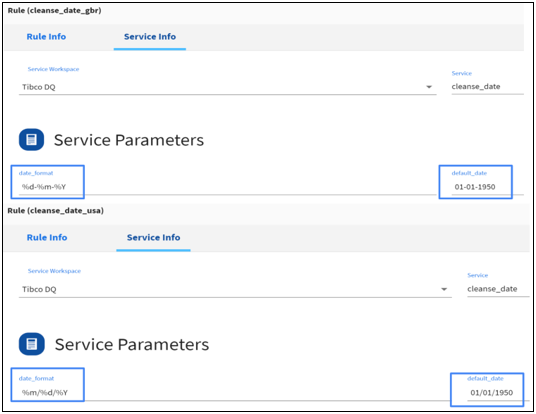
This is a simple illustration of a single Service used to create multiple Rules in TIBCO DQ. We are going to use a built-in Service named cleanse_date that takes input date values in any format, automatically infers the input date format, verifies if the date values represent valid calendar dates, and produces output dates in the user-specified format.

Service Details:

We are going to define two Rules by specifying different values for the Service Parameters.

  1. cleanse_date_usa will generate output dates in “%m/%d/%Y” format and will default invalid or missing dates to 01/01/1950.
  2. cleanse_data_gbr will generate output dates in “%d-%m-%Y’ format and will default invalid or missing dates to 01-01-1950.

As shown below, both of these Rules refer to the same Service, but are configured with different values for the Service parameters. For more information on how to create new Rules, see Adding New Rules.

Data Profiling

TIBCO DQ's Profiler performs technical analysis of data to generate output, such as:

When users upload a new data set, they have the ability to add the source metadata. They also have the ability to select the data attributes for profiling analysis and can set up various data expectations. User defined data expectations for an input data set factor into the calculation of Profile and DQ Scores for that data set.

Data expectations that can be set by the user:

TIBCO DQ’s Profiler generates detailed results in JSON format and stores the detailed results in the file system. It also persists key statistics and metrics in the analytics repository. TIBCO DQ’s Profiler cannot be customized by users.

Data Quality (DQ) Analysis

In TIBCO DQ, Rules are used to perform Data Quality (DQ) analysis. DQ analysis involves cleansing (removing junk or unexpected characters), standardization (reformatting to a consistent format), verification against a series of tests to ascertain that the values accurately represent the intended real-world entity, and data enrichment (imputing missing values or augmenting data from reference data sources).

In general, DQ analysis of an input data set results in the following output values:

Scoring

In this section:

TIBCO DQ delivers two sets of scores: Profile Scores and Data Quality (DQ) Scores

In order to get accurate scores, it is recommended that users provide the source metadata and configure their expectations of the data.

Source Metadata

Data expectations that can be set by the user:

Profile Score

TIBCO DQ’s Profiler compares the profiling results against data expectations set by the user to calculate individual scores for each data attribute and a summarized score for the complete data set.

Users are required to set up the following data expectations to get accurate profile scores:

  • Column values should be unique. User expects values in the data attribute to be unique.
  • Column values can be null. User does not always expect a value for the data attribute.
  • Business impact. An indicator of how the quality of data in this data attribute affects downstream business applications (HIGH, MEDIUM, or LOW).

Profiling stats for individual data attributes are scored against the first two expectations. Overall profile score is calculated as a Weighted average score that applies business impact as weights to the individual data attribute's profiling scores.

Data Quality (DQ) Score

TIBCO DQ calculates DQ scores for each data attribute or a group of data attributes that is mapped to a Rule and also generates a summarized score for the complete data set. Users are required to set up the following expectation to get accurate DQ scores:

  • Business impact. An indicator of how the quality of data in this data attribute affects downstream business applications (HIGH, MEDIUM, or LOW).

DQ stats for individual data attributes are scored against tag categories. The overall DQ score is calculated as a weighted average score that applies business impact as weights to the individual data attribute’s DQ score.