Managing an Association Relationship
With SmartMapper Business UI, you can search, create, delete, and update relationship instances of an association relationship.
The management of an association relationship is performed on the Association Relationship Management page. See Identity Relationship User Interface for more details regarding the selected association relationship.
- Procedure
- Log in to SmartMapper Business UI, as described in Logging in to SmartMapper Business UI.
- Click
Association from the menu and select an association relationship.
You are brought to the Association Relationship Management page. As shown, Order is the anchor participant to represent the Map_Order_Cust association relationship.
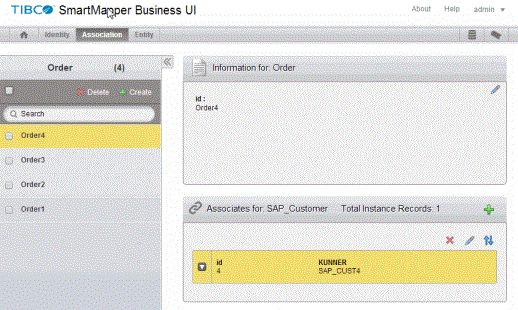
- Do the following steps to manage the selected association relationship:
Select the check boxes next to the anchor participant instances that you want to delete and click
 in the left panel.
Note: Only the relationship instances that are associated with the selected anchor participants are deleted. Corresponding entity instances are not deleted.Click
in the left panel.
Note: Only the relationship instances that are associated with the selected anchor participants are deleted. Corresponding entity instances are not deleted.Click in the left panel to add an association relationship instance.
Click an anchor participant to manage the association relationship instance that this anchor participant is associated with. By default, the first anchor participant is selected.
in the left panel to add an association relationship instance.
Click an anchor participant to manage the association relationship instance that this anchor participant is associated with. By default, the first anchor participant is selected.
Subtopics