Introduction to the Spotfire environment
The Spotfire® environment is installed and configured to enable users to analyze their data in the Spotfire® clients.
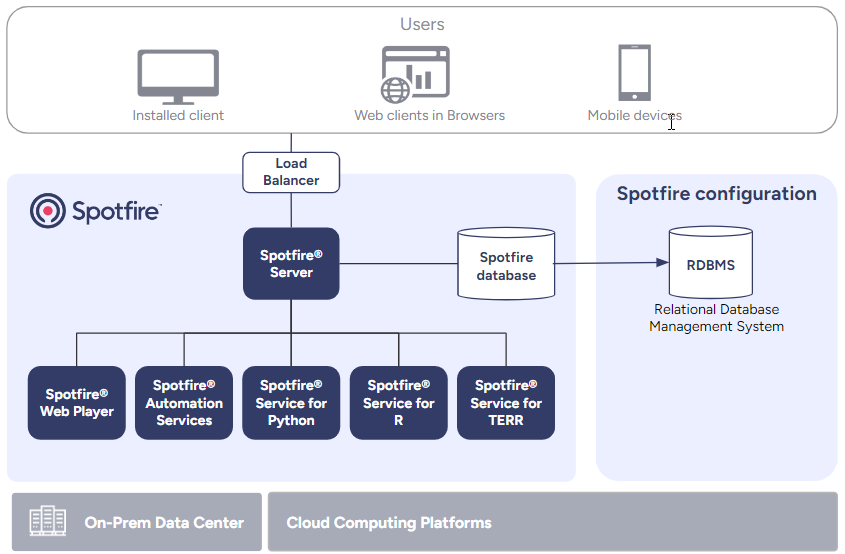
* The load balancer is optional but recommended when using multiple Spotfire server instances.
- The Spotfire® Server is the central component of the Spotfire® environment, to which the Spotfire® clients can connect. Multiple nodes can be installed and connected to Spotfire® Server.
- The Spotfire® Web Player service and the Spotfire® Automation Services service are installed on nodes to enable the use of Spotfire web clients and the running of Spotfire® Automation Services jobs.
- The data function services (the Spotfire® Enterprise Runtime for R - Server Edition (a/k/a the TERR™ service), the Spotfire® Service for R, and the Spotfire® Service for Python) enable advanced statistical analysis in the clients.
- The server is connected to a Spotfire database that contains a user directory and stores analyses and configuration files.
- Entities in the Spotfire environment can be configured and monitored from the Spotfire Server web administration pages.
You can deploy the Spotfire platform using physical servers, virtual machines or containers. This document provides the base for most common deployment and configuration scenarios.
To deploy Spotfire® using containers and Helm charts on a Kubernetes cluster you can either use the pre-built images and charts as described in the Spotfire on Kubernetes User Guide, or use the recipes from Cloud Deployment Kit for Spotfire® as they are, or as the starting point for creating your own recipes.
If you are upgrading, see Upgrading Spotfire and see the Release Notes for each product and version for information about new features and other changes.
- Spotfire Server introduction
Spotfire Server is the administrative center of any Spotfire environment. - Spotfire database introduction
The Spotfire database stores the information that the Spotfire Server needs to control the Spotfire environment, including users, groups, licenses, preferences, shared analyses, and system configuration data. - Nodes and services introduction
The installed client can be used together with the Spotfire Server directly, but the Spotfire environment also includes a number of different services that enhance your system in different ways. To enable the use of the services, you install node managers that help with the communication between the servers and the services. - Spotfire clients introduction
Spotfire end users connect to Spotfire Server using either an installed client or a web client. - Environment communication introduction
All back-end communication in a Spotfire environment is secured by HTTPS/TLS, complying with current security standards and industry best practices. - Deployments and deployment areas introduction
To deploy Spotfire software, the administrator places software packages in a deployment area on the Spotfire Server, and assigns the deployment area to particular user groups.