Using Synonyms for Data Sources and Data Targets
Servers, including the Reporting Server, access local and remote data sources and data targets using synonyms, which contain the metadata for a data source. This metadata consists of the attributes that describe the data source or target.
Since ibi Data Migrator processing depends upon the appropriate metadata being available to the Server and any remote servers in your configuration, you must create synonyms for all data sources and any existing data targets before you can use them in a flow. For information about providing metadata to servers, see Setup At a Glance and Remote ibi WebFOCUS Reporting Server Setup At a Glance.
The ibi Data Migrator desktop interface application directory tree lists the synonyms available to the ibi Data Migrator user for data sources and data targets. This structure is also known as the user's Application Path on the server.
General Guidelines for Synonyms
- The first character
in a synonym name must be a letter. The remaining characters can
be any combination of letters, numbers, and underscores (_). The
synonym name cannot exceed 64 characters. When naming a synonym,
you must avoid the following:
- Names containing capital letters.
- A name beginning with the letters ETL or SYS. These prefixes are reserved for ibi Data Migrator internal use.
- In a FOCUS/FDS or XFOCUS data sources, a non-unique field name.
- Names that are used as commands within ibi Data Migrator. These are HOLD, SQLIN, SQLGET, and MODIFY.
- Names containing spaces, dashes (-), and other non-standard characters in both the source and target data columns (*, &, #, $, %, @).
- Synonyms must
not exceed any of the following:
- Approximately 3,000 columns.
- 30K of total column name character length.
- 16K for single LRECL (total length of field formats, one instance of a row).
- Column names cannot exceed 128 characters.
See the ibi™ WebFOCUS® Adapter Administration manual for suggestions on how to access your structures without pressing these limits.
- For column
names, avoid the following:
- Special characters. Only alphanumeric characters and underscores are permitted in column names.
- Names beginning with the capital letter E followed by a two-digit or three-digit number, for example, E01 - E999.
- Reserved words,
for example:
ALIAS, ALL, ALTER, AND, ANY, AS, ASC, AUTHORIZATION, AVG, BEGIN, BETWEEN, BINARY, BIT, BOTH, BY, CALL, CASE, CAST, CHAR, CHARACTER, CHECK, CLOSE, COALESCE, COMMIT, CONNECT, CORRESPONDING, COUNT, CREATE, CROSS, CURRENT, CURSOR, DATE, DEALLOCATE, DEC, DECIMAL, DECLARE, DEFAULT, DELETE, DESC, DISTINCT, DO, DOUBLE, DROP, ELSE, ELSEIF, END, ESCAPE, EXCEPT, EXECUTE, EXISTS, FETCH, FLOAT, FOR, FOREIGN, FROM, FULL, FUNCTION, GET, GRANT, GROUP, HAVING, IF, IN, INDEX, *INDICATOR, INNER, INOUT, INSERT, INT, INTEGER, INTERSECT, INTO, IS, ITERATE, JOIN, KEY, LEADING, LEAVE, LEFT, LIKE, LOOP, MAX, MIN, NATURAL, NOT, NULL, NULLIF, NUMERIC, OF, ON, ONLY, OPEN, OPTION, OR, ORDER, OUT, OUTER, PRECISION, PREPARE, PRIMARY, PROCEDURE, REAL, REFERENCES, REPEAT, RETURN, RETURNS, REVOKE, RIGHT, ROLLBACK, ROW, ROWS, SCHEMA, SELECT, SET, SMALLINT, SOME, SUM, TABLE, THEN, TIME, TIMESTAMP, TO, TRAILING, UNION, UNIQUE, UNTIL, UPDATE, USER, USING, VALUES, VARCHAR, VARYING, VIEW, WHEN, WHERE, WHILE, WITH, WORK, END, COLFETCH, CONCAT, DATABASE, DATETIME, DAY, DAYS, EXPLAIN, GRAPHIC, HOUR, HOURS, IMAGE, INCLUDE, INDEX, LOCK, LOGICAL, LONG, MICROSECOND, MICROSECONDS, MILLISECOND, MILLISECONDS, MINUTE, MINUTES, MONEY, MONTH, MONTHS, NUMBER, OPTIMIZE, PACKAGE, PERCENT, PLAN, PROGRAM, PURGE, QUERYNO, RAW, RESET, SECOND, SECONDS, SERIAL, SMALLFLOAT, STOGROUP, SYNONYM, SYSNAME, TABLESPACE, TEXT, TRUNCATE, USER_TYPE_NAME, VARBINARY, VARGRAPHIC, YEAR, YEARS
- Synonyms created using the Dynamic Columns option (NOCOLS parameter) should not be used with ibi Data Migrator because their columns and formats will not display when building flows in the ibi Data Migrator desktop interface.
Inclusion of Application Directory Names With Flow Components
The WebFOCUS Reporting Server supports inclusion of application directory names in flow component labels. This means that data and process flows can store information about the application directories where the synonyms or procedures that they use are located.
When you build data flows, by default, they will not include application directory names. That means that the flow will not save the application directory name with the source or existing target. If you use a synonym that exists in more than one application directory, you will receive a warning message, as shown in the following image.
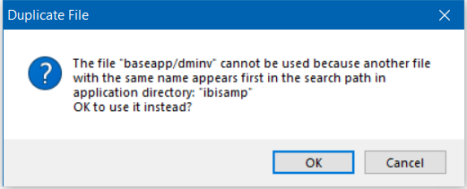
The flow will pick up the source from the first application directory in the application path.
To include application directory names in data flows, on the Home tab, in the Tools group, click Options. Click Data Flow and select the Use application directory name with flow components checkbox from the Data Flow Designer page. This way your flow will use exactly the synonym you specify.
For process flows, the default is to include application directory names.
Guidelines for Variable Length Character and Text Columns in Synonyms
If you are using variable length character or text columns in your synonyms, you should be aware of the following special considerations.
Variable Length Character Columns
ibi Data Migrator supports variable length character columns that are described in a relational database as VARCHAR. This attribute enables you to copy such columns without padding them with spaces to the full column width or removing trailing spaces. It enables you, for example, to copy a column containing a single space.
This support is enabled by default.
When new synonyms are created, they are created with variable length columns described as:
AnV
where:
Is the maximum column width.
TEXT (TX) Columns
ibi Data Migrator also supports columns described with ACTUAL=TX for Text columns. This includes data types MS SQL Server® VARCHAR(MAX) and Text, ORACLE LONG, and Db2® LONG VARCHAR. Sample Data displays only the first 50 characters of these columns.