Supported data sources for data connections
The following are the external data sources that this version of Spotfire has native support for. In order to connect to a data source, you use a connector to create a data connection. Some connectors have support for more than one data source, which is why there are more supported data sources than connectors.
All these data sources are available in the
Connect to list in the
Files and data
flyout. From there you can easily
create a new connection or find shared connections in your library.
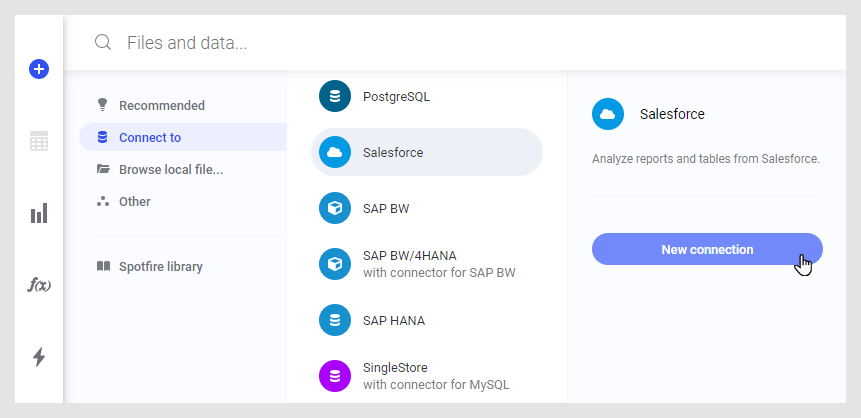
Data sources and connectors
For help and documentation about connecting to and accessing data from a specific data source, follow the link for the corresponding connector in the list.
| Data source | Connector name |
|---|---|
| Amazon Aurora MySQL | MySQL |
| Amazon Aurora PostgreSQL | PostgreSQL |
| Amazon EMR Hive | Hortonworks |
| Amazon EMR Spark SQL | Apache Spark SQL |
| Amazon RDS for MariaDB | MySQL |
| Amazon RDS for MySQL | MySQL |
| Amazon RDS for Oracle | Oracle |
| Amazon RDS for PostgreSQL | PostgreSQL |
| Amazon RDS for SQL Server | Microsoft SQL Server |
| Amazon Redshift | Amazon Redshift |
| Apache Drill | Apache Drill |
| Apache Hive | Hortonworks |
| Apache Spark SQL | Apache Spark SQL |
| Brytlyt | PostgreSQL |
| Cloudera Hive | Cloudera Hive |
| Cloudera Impala | Cloudera Impala |
| Cloudera Spark SQL | Apache Spark SQL |
| Databricks | Apache Spark SQL |
| Dremio | Dremio |
| Google Analytics | Google Analytics |
| Google BigQuery | Google BigQuery |
| Google Cloud SQL for MySQL | MySQL |
| Google Cloud SQL for PostgreSQL | PostgreSQL |
| Google Cloud SQL for SQL Server | Microsoft SQL Server |
| Greenplum | Greenplum |
| Hortonworks Hive | Hortonworks |
| Hortonworks Spark SQL | Apache Spark SQL |
| IBM BigInsights Hive | Hortonworks |
| IBM BigInsights Spark SQL | Apache Spark SQL |
| IBM DB2 | IBM DB2 |
| IBM DB2 Big SQL | IBM DB2 |
| IBM Netezza | IBM Netezza |
| MapR Hive | Hortonworks |
| MapR Spark SQL | Apache Spark SQL |
| MariaDB | MySQL |
| Microsoft Azure Analysis Services | Microsoft SQL Server Analysis Services |
| Microsoft Azure Database for MariaDB | MySQL |
| Microsoft Azure Database for MySQL | MySQL |
| Microsoft Azure Database for PostgreSQL | PostgreSQL |
| Microsoft Azure HDInsight Hive | Hortonworks |
| Microsoft Azure HDInsight Spark SQL | Apache Spark SQL |
| Microsoft Azure SQL Database | Microsoft SQL Server |
| Microsoft Azure Synapse Analytics | Microsoft SQL Server |
| Microsoft SQL Server | Microsoft SQL Server |
| Microsoft SQL Server Analysis Services | Microsoft SQL Server Analysis Services |
| Microsoft SharePoint Online | Microsoft SharePoint Online |
| MongoDB Connector for BI | MySQL |
| MySQL | MySQL |
| OData | OData |
| Oracle | Oracle |
| Oracle Essbase | Oracle Essbase |
| PostgreSQL | PostgreSQL |
| SAP BW | SAP BW |
| SAP BW/4HANA | SAP BW |
| SAP HANA | SAP HANA |
| Salesforce | Salesforce |
| SingleStore | MySQL |
| Snowflake | Snowflake |
| TIBCO Cloud Data Streams | Spotfire Data Streams |
| TIBCO Cloud Live Apps | TIBCO Cloud™ Live Apps |
| TIBCO Data Virtualization | TIBCO Data Virtualization |
| TIBCO Spotfire Advanced Data Services | TIBCO Data Virtualization |
| Spotfire Data Streams | Spotfire Data Streams |
| Teradata | Teradata |
| Vertica | Vertica |
- Accessing data from Amazon Redshift
With Spotfire, you can connect to, access, and analyze your Amazon Redshift data. In this article, you learn how to use Spotfire's built-in data connector for Amazon Redshift. - Accessing data from Apache Drill
You can connect to and access data from Apache Drill in Spotfire. - Accessing data from Apache Spark SQL and Databricks
You can access data from Spark SQL and Databricks systems in Spotfire. - Connector for Cloudera Hive — Features and settings
You can connect to and access data from Cloudera Hive databases with the connector for Cloudera Hive. On this page, you can find information about the capabilities, available settings, and things to keep in mind when you work with data connections to Cloudera Hive. - Accessing data from Cloudera Impala
You can access data from Cloudera Impala systems in Spotfire. - Accessing data from Dremio
You can connect to and access data from Dremio in Spotfire. - Accessing data from Google Analytics
If you have a Google Analytics account, you can access and analyze data from Google Analytics in Spotfire. - Accessing data from Google BigQuery
You can access and analyze your Google BigQuery data in Spotfire. This page introduces how to create a data connection to Google BigQuery, and provides information about how to work with BigQuery data in Spotfire. - Connector for Greenplum — Features and settings
You can connect to and access data from Greenplum databases with the connector for Greenplum. On this page, you can find information about the capabilities, available settings, and things to keep in mind when you work with data connections to Greenplum. - Connector for Hortonworks — Features and settings
You can connect to and access data from Hortonworks databases with the connector for Hortonworks. On this page, you can find information about the capabilities, available settings, and things to keep in mind when you work with data connections to Hortonworks. - Connector for IBM DB2 — Features and settings
You can connect to and access data from IBM DB2 databases with the connector for IBM DB2. On this page, you can find information about the capabilities, available settings, and things to keep in mind when you work with data connections to IBM DB2. - Connector for IBM Netezza — Features and settings
You can connect to and access data from IBM Netezza databases with the connector for IBM Netezza. On this page, you can find information about the capabilities, available settings, and things to keep in mind when you work with data connections to IBM Netezza. - Accessing data from Microsoft SharePoint Online
You can connect to and access data from Microsoft SharePoint Online in Spotfire. - Accessing data from Microsoft SQL Server
You can connect to and access data from Microsoft SQL Server systems with the data connector for Microsoft SQL Server. On this page, you can find information about the capabilities, available settings, and things to keep in mind when you work with data connections to Microsoft SQL Server. - Accessing data from Microsoft SQL Server Analysis Services
Follow the steps below to create a new connection to Microsoft SQL Server Analysis Services, and add the data either as imported or in-database data. - Connector for MySQL – Features and settings
You can connect to and access data from MySQL databases with the connector for MySQL. On this page, you can find information about the capabilities, available settings, and things to keep in mind when you work with data connections to MySQL. - Connector for OData — Features and settings
You can connect to and access data from OData. OData (Open Data Protocol) is a standard for providing data as a web service. You can use the OData connector in Spotfire to load data from any web service complying with the OData standard. On this page, you can find information about the capabilities, available settings, and things to keep in mind when you work with data connections to OData. - Connector for Oracle — Features and settings
You can connect to and access data from Oracle databases with the connector for Oracle. On this page, you can find information about the capabilities, available settings, and things to keep in mind when you work with data connections to Oracle. - Accessing data from Oracle Essbase
Follow the steps below to create a new connection to Oracle Essbase, and add the data either as imported or in-database data. - Connector for PostgreSQL – Features and settings
You can connect to and access data from PostgreSQL databases with the connector for PostgreSQL. On this page, you can find information about the capabilities, available settings, and things to keep in mind when you work with data connections to PostgreSQL. - Accessing data from Salesforce
If you have Salesforce account, you can access and analyze data from Salesforce in Spotfire. - Accessing data from SAP BW
Follow the steps below to create a new connection to SAP BW, and add the data either as imported or in-database data. - Accessing data from SAP HANA
You can connect to and access data from SAP HANA in Spotfire. When you want to connect to SAP HANA, you can either open and reuse a connection that is shared in your Spotfire library, or you can create a new connection. - Connector for Snowflake — Features and settings
You can connect to and access data from Snowlake in Spotfire. On this page, you can find information about the capabilities, available settings, and things to keep in mind when you work with data connections to Snowflake. - Streaming data from Spotfire Data Streams
You can analyze streaming data in Spotfire. To access streaming data, you use the Spotfire Data Streams connector. - Connector for Teradata — Features and settings
You can connect to and access data from Teradata databases with the connector for Teradata. On this page, you can find information about the capabilities, available settings, and things to keep in mind when you work with data connections to Teradata. - Accessing Data from TIBCO Cloud™ Live Apps
You can connect to TIBCO Cloud™ Live Apps to analyze your case data in Spotfire. - Accessing data from TIBCO Data Virtualization
With Spotfire, you can connect to, access, and analyze your data from TIBCO Data Virtualization. In this article, you learn how to use Spotfire's built-in data connector for TIBCO Data Virtualization. With the connector, you can create a data connection to any TIBCO Data Virtualization server that you have access to. - Connector for Vertica — Features and settings
You can connect to and access data from Vertica databases with the connector for Vertica. On this page, you can find information about the capabilities, available settings, and things to keep in mind when you work with data connections to Vertica.
Parent topic: Data from databases